# Be in control of your CRM

> A power-up for your tasks, opportunities, files and emails. Bulk actions. Files custom field. Mark opportunities as done. Custom fields in email campaigns.

Source: https://blog.salesflare.com/be-in-control-of-your-crm-deadb33c43d0
Language: en
Published: 2018-07-31  ·  Updated: 2026-06-29

---
<!-- QUARANTINED — not auto-converted.
     Medium import: .graf markup (one of the 50 identified in FINDINGS)
     Body below is the chrome-stripped source HTML, awaiting hand conversion. -->

<h2>A power-up for your tasks, opportunities, files and emails.</h2>

<p id="0d02" class="graf graf--p graf-after--figure">Like using your time well? 🕑</p>
<p id="3c46" class="graf graf--p graf-after--p">At Salesflare we want to put <strong class="markup--strong markup--p-strong">you</strong> in control of your CRM.</p>
<p id="abda" class="graf graf--p graf-after--p">We’re offering a CRM that works for you, not the other way around. Simple yet powerful. Visual and easy. Fast and modern. And fun to use. 🕺</p>
<p id="481f" class="graf graf--p graf-after--p">This product update brings us one step closer again to that vision.</p>
<p id="d672" class="graf graf--p graf-after--p graf--trailing">We hope you enjoy it. 😍</p>

<hr class="section-divider">

<h2 id="e1e6" class="graf graf--h3 graf--leading">Organize tasks &amp; opportunities in bulk&nbsp;🧙‍</h2>
<p id="5c84" class="graf graf--p graf-after--h3">If you ever have to:</p>
<ul class="postList">
<li id="f45b" class="graf graf--li graf-after--p">Complete a list of suggested tasks</li>
<li id="4f4f" class="graf graf--li graf-after--li">Clear a pipeline and delete its opportunities</li>
<li id="a97f" class="graf graf--li graf-after--li">Assign a series of opportunities to another owner</li>
<li id="80e0" class="graf graf--li graf-after--li">Tag a bunch of opportunities, move them to a different stage,&nbsp;…</li>
<li id="7d7d" class="graf graf--li graf-after--li">Assign a list of tasks to a colleague</li>
<li id="9bad" class="graf graf--li graf-after--li">…</li>
</ul>
<p id="7761" class="graf graf--p graf-after--li">… then we got you covered. 👊</p>
<p id="a9c3" class="graf graf--p graf-after--p"><strong class="markup--strong markup--p-strong">All these actions are now possible in just a few clicks.</strong></p>
<p id="5528" class="graf graf--p graf-after--p">Click the avatars or icons to enter bulk mode, then hit the checkboxes! ✅</p>

<p class="graf graf--p graf-after--figure graf--trailing"><img decoding="async" class="aligncenter size-large wp-image-58553" src="https://blog.salesflare.com/wp-content/uploads/2018/07/salesflare-bulk-actions-1-1024x387.gif" alt="bulk selecting opportunities in salesflare" width="840" height="317" srcset="https://blog.salesflare.com/wp-content/uploads/2018/07/salesflare-bulk-actions-1-1024x387.gif 1024w, https://blog.salesflare.com/wp-content/uploads/2018/07/salesflare-bulk-actions-1-300x113.gif 300w, https://blog.salesflare.com/wp-content/uploads/2018/07/salesflare-bulk-actions-1-768x290.gif 768w, https://blog.salesflare.com/wp-content/uploads/2018/07/salesflare-bulk-actions-1-1536x580.gif 1536w" sizes="(max-width: 840px) 100vw, 840px"></p>
<p class="graf graf--p graf-after--figure graf--trailing">Bulk actions were available on contacts &amp; accounts already for a while, <a class="markup--anchor markup--p-anchor" href="https://blog.salesflare.com/power-up-your-pipeline">more about that here</a>. 👈</p>

<hr class="section-divider">

<h2 id="20e6" class="graf graf--h3 graf--leading">Store files in a custom field&nbsp;💾</h2>

<p id="9265" class="graf graf--p graf-after--h3">You can now create specific custom fields on contacts, accounts and opportunities that can contain files.</p>
<p id="db1b" class="graf graf--p graf-after--p">Fields for offers, proposals, contracts, or other documentation: <strong class="markup--strong markup--p-strong">all files can be neatly organized the way you like it</strong>. 👌</p>
<p id="d036" class="graf graf--p graf-after--p">Files custom fields support adding files by <strong class="markup--strong markup--p-strong">drag and drop</strong>. And you can create as many as you wish.</p>
<figure id="bb7c" class="graf graf--figure graf-after--p graf--trailing">
<div class="aspectRatioPlaceholder is-locked">

<p><img decoding="async" class="graf-image" src="/img/b309391b281f559f.webp"></p>
</div>
</figure>

<hr class="section-divider">

<h2 id="149c" class="graf graf--h3 graf--leading">Mark opportunities as done&nbsp;✅</h2>
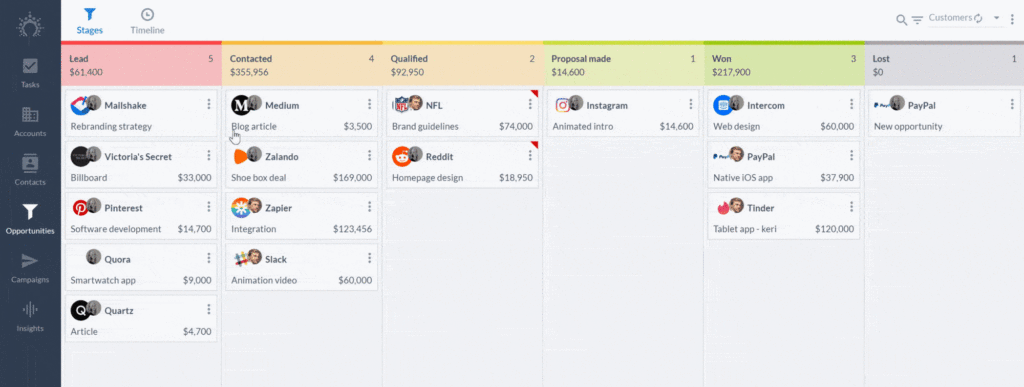

<p id="8ad8" class="graf graf--p graf-after--h3">Hey closer! 👋 Are your won and lost stages becoming too full?</p>
<p id="babd" class="graf graf--p graf-after--p">From now on you can mark opportunities as done to <strong class="markup--strong markup--p-strong">remove won or lost opportunities from your view</strong>. It won’t delete them and won’t mess up your metrics.</p>
<figure id="3aaf" class="graf graf--figure graf-after--p">
<div class="aspectRatioPlaceholder is-locked">

<p><img decoding="async" class="graf-image" src="/img/761d75ea0d2ab66a.webp"></p>
</div>
</figure>
<p id="a6fd" class="graf graf--p graf-after--figure graf--trailing"><strong class="markup--strong markup--p-strong">BONUS:</strong> This is also possible in bulk! 🧙‍</p>

<hr class="section-divider">

<h2 id="720c" class="graf graf--h3 graf--leading">Merge custom fields into email campaigns 💌</h2>

<p id="45bf" class="graf graf--p graf-after--h3">You can now merge any data you have into email campaigns.</p>
<p id="e7ae" class="graf graf--p graf-after--p">That’s right. Any data you have can be used to <strong class="markup--strong markup--p-strong">personalize your emails</strong>. ✨</p>
<figure id="585f" class="graf graf--figure graf-after--p graf--trailing">
<div class="aspectRatioPlaceholder is-locked">

<p><img decoding="async" class="graf-image" src="/img/1356a0e7db2e2e78.webp"></p>
</div>
</figure>

<hr class="section-divider">

<h2 id="493a" class="graf graf--h3 graf--leading">Undo your import&nbsp;🔄</h2>
<p id="56bb" class="graf graf--p graf-after--h3">Made a mistake?</p>
<p id="6592" class="graf graf--p graf-after--p">No worries. You can now hit “Delete import”. It’s that easy.</p>

<figure id="49d3" class="graf graf--figure graf--layoutOutsetCenter graf-after--p">
<div class="aspectRatioPlaceholder is-locked">

<p><img decoding="async" class="graf-image" src="/img/bddb61b4a44c9596.webp"></p>
</div>
</figure>

<p id="603d" class="graf graf--p graf-after--figure"><em class="markup--em markup--p-em">Note: It used to show the button “Delete import” already. This would be used to remove the import record, not the imported data. That’s changed now. </em>👍</p>
<p id="8e72" class="graf graf--p graf-after--p graf--trailing"><strong class="markup--strong markup--p-strong">TIP:</strong> You can also filter your contacts, accounts or opportunities on the import’s tag and clean up more selectively by bulk deleting. 💡</p>

<hr class="section-divider">

<h2 id="273e" class="graf graf--h3 graf--leading">A series of improvements and bug&nbsp;fixes</h2>
<p id="010b" class="graf graf--p graf-after--h3">We improved the performance here and there, fixed the bugs you reported, tweaked some app flows, and much more.</p>
<p id="849a" class="graf graf--p graf-after--p">Some highlights amongst the many improvements we shipped:</p>
<ul class="postList">
<li id="026d" class="graf graf--li graf-after--p">See who adds or removes a colleague to/from an account 👀</li>
<li id="ae41" class="graf graf--li graf-after--li">Copy email addresses to the clipboard in one click 📋</li>
<li id="e0e0" class="graf graf--li graf-after--li">Improvements to accounting, discounts and VAT charging 💱</li>
<li id="e30c" class="graf graf--li graf-after--li">Different text alignment options for the email compose screen 📃</li>
<li id="f334" class="graf graf--li graf-after--li">Allow customers to resubscribe to email campaigns themselves 🔄</li>
</ul>
<p id="9e61" class="graf graf--p graf-after--li graf--trailing">As always, keep the feedback coming — we thrive on it!</p>

<hr class="section-divider">

<h2 id="f272" class="graf graf--h3 graf--leading">Coming up next…&nbsp;🥁</h2>
<ul class="postList">
<li id="0049" class="graf graf--li graf-after--h3">Filter in any way you can imagine 😲</li>
<li id="41a4" class="graf graf--li graf-after--li">Drill down &amp; act on email campaign results 💌</li>
<li id="d84c" class="graf graf--li graf-after--li">Snooze tasks faster ⏰</li>
<li id="69a3" class="graf graf--li graf-after--li">Save filters to create segments 💾</li>
<li id="0458" class="graf graf--li graf-after--li graf--trailing">Import data more easily ✨</li>
</ul>
---

## Related

- [2018, 2019 and beyond](https://blog.salesflare.com/2018-2019-and-beyond.md)
- [More ease of use, more joy](https://blog.salesflare.com/easier-to-use-crm.md)
- [Faster follow-up flows](https://blog.salesflare.com/faster-follow-up-flows.md)
- [Fill Your Pipeline Faster, Import Smarter](https://blog.salesflare.com/fill-your-pipeline-faster.md)
- Previous: [Patrick Campbell of ProfitWell](https://blog.salesflare.com/patrick-campbell-of-profitwell-3de69de544b6.md)
- Next: [Duolingo: how they nailed their product and became the #1 education app](https://blog.salesflare.com/duolingo-iconic-product-e3df449017df.md)