# Verkaufen Sie ein B2B SaaS?

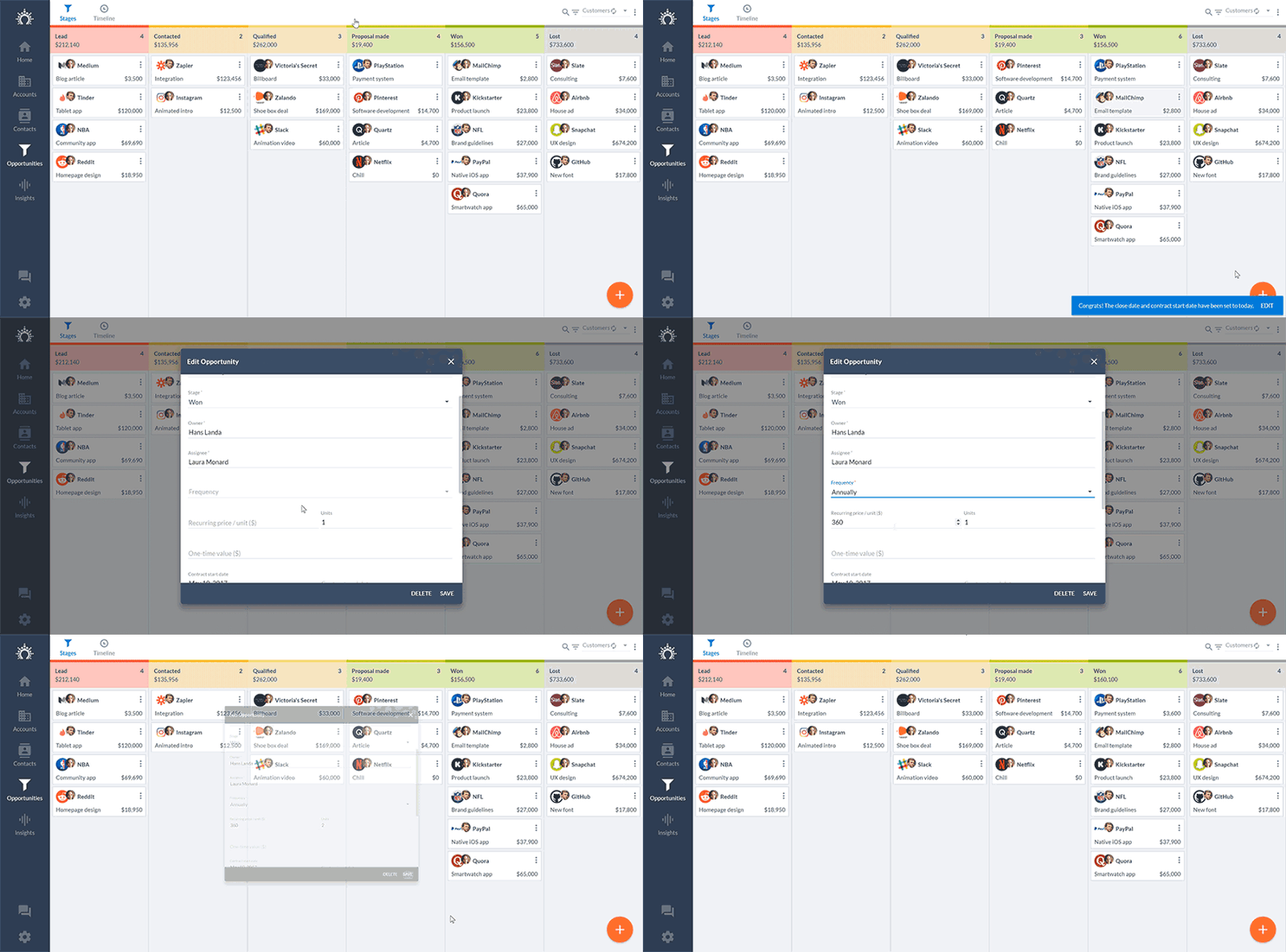
> Viele CRMs unterstützen die Verfolgung von wiederkehrenden Umsätzen oder Abonnements nicht richtig. Deshalb haben wir es uns zur Aufgabe gemacht, dies zu ändern: In Salesflare können Sie jetzt ganz einfach Ihre wiederkehrenden Umsätze und die erwarteten Vertragsgrößen verfolgen.

Source: https://blog.salesflare.com/de/verkaufen-sie-ein-b2b-saas-5b7cbde7b8f8
Language: de
Published: 2017-05-09  ·  Updated: 2026-06-29

---
<!-- QUARANTINED — not auto-converted.
     Medium import: .graf markup (one of the 50 identified in FINDINGS)
     Body below is the chrome-stripped source HTML, awaiting hand conversion. -->

<header></header><section class="p-summary"></section><h2>Salesflare verfolgt Ihre wiederkehrenden Einnahmen<strong class="markup--strong markup--h4-strong">&nbsp;</strong>📈</h2><p id="392e" class="graf graf--p graf-after--figure">Viele CRM-Systeme unterstützen die Verfolgung von wiederkehrenden Umsätzen oder Abonnements nicht richtig. Deshalb müssen SaaS-Start-up-Gründer ihre monatlich wiederkehrenden Umsätze (MRR) in der Regel in einer Tabellenkalkulation festhalten.</p><p id="46cb" class="graf graf--p graf-after--p graf--trailing">Ja, das ist ziemlich ätzend... Deshalb haben wir uns vorgenommen, dies zu ändern: Sie können jetzt <strong class="markup--strong markup--p-strong">Ihre MRR und erwarteten Geschäftsgrößen</strong> in <a class="markup--anchor markup--p-anchor" href="https://salesflare.com/de?utm_source=blog&amp;utm_campaign=saasrevenue">Salesflare</a> ganz einfach verfolgen. 📈</p><hr class="section-divider"><h2 id="733e" class="graf graf--h3 graf--leading">Wie Sie Ihre SaaS-Einnahmen in Salesflare verfolgen</h2><p id="b4bb" class="graf graf--p graf-after--h3">Es ist <strong class="markup--strong markup--p-strong">wirklich einfach</strong>:</p><ol class="postList"><li id="6d80" class="graf graf--li graf-after--p">Ziehen Sie diese Verkaufschance einfach an sich!</li><li id="7ee5" class="graf graf--li graf-after--li">Stellen Sie Einheiten und Frequenz ein.</li><li id="bfda" class="graf graf--li graf-after--li">That's it! 💥 Der <a href="https://salesflare.com/de/templates/sales-forecast-template/">erwartete Umsatz</a> wird für Sie berechnet.</li></ol><figure id="f9fc" class="graf graf--figure graf-after--li"><div class="aspectRatioPlaceholder is-locked"><p><img width="800" height="395" class="graf-image" src="https://blog.salesflare.com/wp-content/uploads/2017/05/1F9TnjlzH_n7yRoghN_RuLw.gif" loading="eager" decoding="sync" fetchpriority="high"></p></div></figure><p id="c93a" class="graf graf--p graf-after--figure">Sie erhalten <strong class="markup--strong markup--p-strong">diese schöne Grafik</strong>:</p><figure id="43d9" class="graf graf--figure graf-after--p"><div class="aspectRatioPlaceholder is-locked"><p><img width="800" height="542" class="graf-image" src="https://blog.salesflare.com/wp-content/uploads/2017/05/10DmmwhYssGf5vUNlBI_ALA.png" loading="lazy" decoding="async" fetchpriority="low"></p></div></figure><p id="091a" class="graf graf--p graf-after--figure">Um Ihnen die volle Kontrolle zu geben, können Sie natürlich ein paar <strong class="markup--strong markup--p-strong">optionale</strong> Dinge einstellen:</p><ul class="postList"><li id="2d77" class="graf graf--li graf-after--p">Das <strong class="markup--strong markup--li-strong">Abschlussdatum</strong> (wenn Sie das Geschäft abschließen) und das <strong class="markup--strong markup--li-strong">Startdatum</strong> (wenn das Abonnement beginnt) sind auf heute eingestellt. Dies dient der Vereinfachung und kann natürlich geändert werden.</li><li id="51b0" class="graf graf--li graf-after--li">Der <strong class="markup--strong markup--li-strong">Stückpreis</strong> wird mit dem von Ihnen in den Einstellungen angegebenen Standardwert vorausgefüllt. Kann bei Bedarf auch geändert werden!</li><li id="b508" class="graf graf--li graf-after--li">Haben Sie auch <strong class="markup--strong markup--li-strong">Einrichtungskosten</strong>? Keine Sorge, dafür gibt es ein Feld "Einmaliger Wert".</li></ul><p id="019b" class="graf graf--p graf-after--li graf--trailing"><a class="markup--anchor markup--p-anchor" href="https://salesflare.com/de?utm_source=blog&amp;utm_campaign=saasrevenue">Salesflare</a> Wir kümmern uns um Sie 👊</p><hr class="section-divider"><h2 id="69c3" class="graf graf--h3 graf--leading"><strong class="markup--strong markup--h3-strong">Möchten Sie alles automatisieren?</strong></h2><p id="224b" class="graf graf--p graf-after--h3">Ja, Sie können <strong class="markup--strong markup--p-strong">Alles über die </strong><a class="markup--anchor markup--p-anchor" href="https://salesflare.com/de?utm_source=blog&amp;utm_campaign=saasrevenue"><strong class="markup--strong markup--p-strong">Salesflare</strong></a><strong class="markup--strong markup--p-strong"> API</strong> aktualisieren.</p><p id="4432" class="graf graf--p graf-after--p">Wir haben das selbst gemacht und wir rühren keinen CRM-Finger mehr... ☝️</p><p id="2433" class="graf graf--p graf-after--p">Bedeutet das, dass wir faul sind? Vielleicht 😏 Sicher ist, dass wir lieber <strong class="markup--strong markup--p-strong">unsere Zeit damit verbringen, Sie zu unterstützen</strong>, als unsere Finanzen zu verfolgen!</p><hr class="section-divider"><p id="d897" class="graf graf--p graf--leading graf--trailing"><em class="markup--em markup--p-em">Willst du mal sehen, wie das ist?<br> </em><strong class="markup--strong markup--p-strong"><em class="markup--em markup--p-em">Gehe zu </em></strong><a class="markup--anchor markup--p-anchor" href="https://salesflare.com/de?utm_source=blog&amp;utm_campaign=saasrevenue"><strong class="markup--strong markup--p-strong"><em class="markup--em markup--p-em">salesflare.com</em></strong></a><strong class="markup--strong markup--p-strong"><em class="markup--em markup--p-em"> und starten Sie eine kostenlose Testversion!</em></strong></p><footer>&nbsp;</footer>
---

## Related

- [Füllen Sie Ihre Pipeline schneller, importieren Sie intelligenter](https://blog.salesflare.com/de/fullen-sie-ihre-pipeline-schneller.md)
- [Klüger schreiben, sich vorarbeiten](https://blog.salesflare.com/de/schreiben-sie-intelligenter-arbeiten-sie-auf-ihre-weise.md)
- [Schneller nachfassen](https://blog.salesflare.com/de/schneller-nachfassen.md)
- [Schnell reparieren](https://blog.salesflare.com/de/schnell-reparieren.md)
- Previous: [Verkaufshelden: AIESEC](https://blog.salesflare.com/de/verkaufshelden-aiesec-4dde1d21d592.md)
- Next: [Automatische Synchronisierung von Salesflare-Kontakten über Ihre Apps hinweg mit PieSync](https://blog.salesflare.com/de/salesflare-kontakte-mit-piesync-automatisch-uber-alle-anwendungen-hinweg-synchronisieren-a9013929a55b.md)