# Keep everything in one place

> Our goal at Salesflare is to give you maximum control over your pipeline and customer data, while automating the work as much as possible. So that you can flawlessly manage your customers, all from one place.

Source: https://blog.salesflare.com/keep-everything-in-one-place-622a52367a9c
Language: en
Published: 2017-11-06  ·  Updated: 2026-06-29

---
<!-- QUARANTINED — not auto-converted.
     Medium import: .graf markup (one of the 50 identified in FINDINGS)
     Body below is the chrome-stripped source HTML, awaiting hand conversion. -->

<h2>Files, meetings, tasks and customer data — it‘s easy to manage.</h2>

<p class="graf graf--p graf-after--figure">Our goal at Salesflare is to give you maximum control over your pipeline and customer data, while automating the work as much as possible. So that you can flawlessly manage your customers, all from one place.</p>
<p id="ad5b" class="graf graf--p graf-after--p graf--trailing">With that in mind, we’ve just released a new series of cool features.</p>

<hr class="section-divider">

<h2 id="d1fa" class="graf graf--h3 graf--leading">Upload important files to Salesflare</h2>
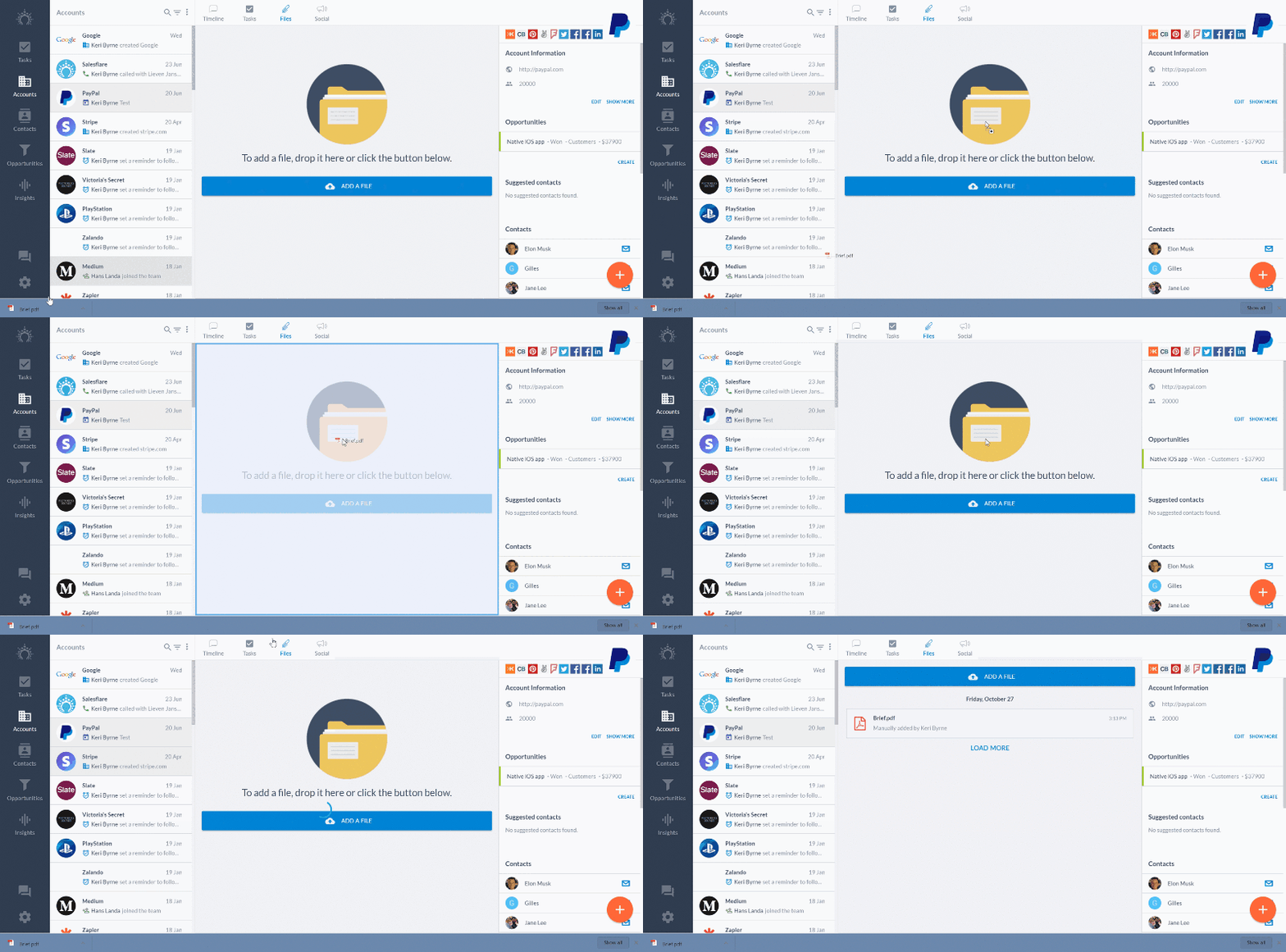
<p id="5f2a" class="graf graf--p graf-after--h3">Salesflare automatically picks up files from emails, and shows them in a handy <em class="markup--em markup--p-em">Files</em> overview for each customer.</p>
<p id="308c" class="graf graf--p graf-after--p">From today, you can also upload and attach any file you like to the related customer! 📂</p>
<figure id="9143" class="graf graf--figure graf-after--p">
<div class="aspectRatioPlaceholder is-locked">

<p><img decoding="async" class="graf-image" src="https://blog.salesflare.com/wp-content/uploads/2017/11/1DCAMAETrkucBeO0bIXXmRA.gif"></p>
</div><figcaption class="imageCaption">Drag and drop to upload a file to Salesflare.</figcaption></figure>
<p id="a447" class="graf graf--p graf-after--figure graf--trailing">Just drag and drop the file, or hit the big blue <em class="markup--em markup--p-em">Add a file</em> button.</p>

<hr class="section-divider">

<h2 id="76e9" class="graf graf--h3 graf--leading">See meetings and tasks in one&nbsp;place</h2>
<p id="e9ee" class="graf graf--p graf-after--h3">Want to see your whole day in one place? We’ve made it happen.</p>

<figure id="e6a2" class="graf graf--figure graf--layoutOutsetCenter graf-after--p">
<div class="aspectRatioPlaceholder is-locked">

<p><img decoding="async" class="graf-image" src="https://blog.salesflare.com/wp-content/uploads/2017/11/1snZitARApdDOzFasl9ITyQ.png"></p>
</div><figcaption class="imageCaption">See your tasks and meetings for today in one&nbsp;place.</figcaption></figure>

<p id="e07a" class="graf graf--p graf-after--figure">In the <em class="markup--em markup--p-em">Today</em> screen, you can now see all your scheduled meetings and tasks. Below that you can find all overdue tasks to pick up. And below that the automatically suggested ones.</p>
<p id="88c3" class="graf graf--p graf-after--p">The <em class="markup--em markup--p-em">Upcoming</em> screen shows you what meetings and tasks are coming up in the next days.</p>
<p id="6b36" class="graf graf--p graf-after--p">And on the <em class="markup--em markup--p-em">Tasks</em> tab of every account, you can see this same overview as well for the specific account.</p>
<p id="6864" class="graf graf--p graf-after--p graf--trailing">You’ll always have a perfect view on what to do.</p>

<hr class="section-divider">

<h2 id="048d" class="graf graf--h3 graf--leading">Import customer data easily: it’s out of&nbsp;beta!</h2>
<p id="99d5" class="graf graf--p graf-after--h3">Thanks to the feedback out of our awesome beta testers for the import module, it is now ready to go out of beta. 🚀</p>
<p id="f3b9" class="graf graf--p graf-after--p">Head to <em class="markup--em markup--p-em">Settings &gt; Import data</em> to import a&nbsp;.csv with your accounts, contacts and opportunities.</p>

<figure id="e48f" class="graf graf--figure graf--layoutOutsetCenter graf-after--p">
<div class="aspectRatioPlaceholder is-locked">

<p><img decoding="async" class="graf-image" src="https://blog.salesflare.com/wp-content/uploads/2017/11/1X1E7W0zHz2kTVqFOfq29jw.png"></p>
</div><figcaption class="imageCaption">Visually map the columns of your&nbsp;.csv on your fields Salesflare.</figcaption></figure>

<p id="7da0" class="graf graf--p graf-after--figure">You can:</p>
<ul class="postList">
<li id="08fa" class="graf graf--li graf-after--p">Visually map the columns of your&nbsp;.csv on your fields Salesflare</li>
<li id="968e" class="graf graf--li graf-after--li">Import data into custom fields (yes, that works!)</li>
<li id="2b06" class="graf graf--li graf-after--li">Get an overview of all records that couldn’t import by downloading the <em class="markup--em markup--li-em">error file</em>, check the errors, fix them and re-import (no need to re-import everything!)</li>
</ul>
<p id="7b9f" class="graf graf--p graf-after--li graf--trailing">Need some more tips and details? We got you covered <a class="markup--anchor markup--p-anchor" href="https://howto.salesflare.com/salesflare/import-tips">in the knowledge base</a>.</p>

<hr class="section-divider">

<h2 id="073b" class="graf graf--h3 graf--leading">Export custom field data&nbsp;too</h2>
<p id="4db6" class="graf graf--p graf-after--h3">You now have <strong class="markup--strong markup--p-strong">full 100% control</strong> over your custom data. 💪</p>
<p id="5dfe" class="graf graf--p graf-after--p">You can:</p>
<ul class="postList">
<li id="c277" class="graf graf--li graf-after--p">Import custom data</li>
<li id="0f72" class="graf graf--li graf-after--li">Export custom data</li>
<li id="24d8" class="graf graf--li graf-after--li">Update it through the API</li>
<li id="1637" class="graf graf--li graf-after--li">View and edit in the app</li>
<li id="ccdf" class="graf graf--li graf-after--li graf--trailing">Use it to filter and segment your data</li>
</ul>

<hr class="section-divider">

<h2 id="4a92" class="graf graf--h3 graf--leading">Customize Salesflare to your&nbsp;region</h2>
<p id="682a" class="graf graf--p graf-after--h3">Ain’t no place like home. Salesflare now adapts to your region and country.</p>
<p id="bb2f" class="graf graf--p graf-after--p">What do you consider the first day of the week? Do you prefer AM/PM or the 24h clock? What currency do you use?</p>
<p id="ec83" class="graf graf--p graf-after--p graf--trailing">Head to <em class="markup--em markup--p-em">Settings &gt; Regional Settings</em> to feel right at home. 🏡</p>

<hr class="section-divider">

<h2 id="a9ff" class="graf graf--h3 graf--leading">A series of improvements and bug&nbsp;fixes</h2>
<p id="78be" class="graf graf--p graf-after--h3">We improved the performance here and there, fixed the bugs you reported, tweaked some app flows, and much more.</p>
<p id="b8a5" class="graf graf--p graf-after--p graf--trailing">As always, keep the feedback coming — we thrive on it! 👊</p>

<hr class="section-divider">

<h2 id="4344" class="graf graf--h3 graf--leading">Coming up next…&nbsp;🥁</h2>
<ul class="postList">
<li id="276a" class="graf graf--li graf-after--h3">Automated emails 📧</li>
<li id="e591" class="graf graf--li graf-after--li">Bulk edit &amp; delete actions</li>
<li id="b403" class="graf graf--li graf-after--li">Multiple email addresses on contacts</li>
<li id="bf0b" class="graf graf--li graf-after--li graf--trailing">More Zapier upgrades!</li>
</ul>

<hr class="section-divider">

<p id="ed38" class="graf graf--p graf--leading graf--trailing">Got a question or need help? Feel free to <a class="markup--anchor markup--p-anchor" href="mailto:support@salesflare.com"><strong class="markup--strong markup--p-strong">send feedback</strong></a> or tweet us at <a class="markup--anchor markup--p-anchor" href="https://twitter.com/salesflare">@salesflare</a>.</p>
---

## Related

- [Fill Your Pipeline Faster, Import Smarter](https://blog.salesflare.com/fill-your-pipeline-faster.md)
- [Write Smarter, Work Your Way](https://blog.salesflare.com/write-smarter-work-your-way.md)
- [Follow Up Faster](https://blog.salesflare.com/follow-up-faster.md)
- [Fix It Fast](https://blog.salesflare.com/fix-it-fast.md)
- Previous: [Sales Heroes: Salestack](https://blog.salesflare.com/sales-heroes-salestack-45996bfbd6c8-2.md)
- Next: [Power up your pipeline](https://blog.salesflare.com/power-up-your-pipeline.md)
