# More automation, more control!

> We’ve been working for a while on the new tasks module, and we’re proud to announce that it’s ready to go out of beta!

Source: https://blog.salesflare.com/more-automation-more-control-ad727b427d99
Language: en
Published: 2017-09-14  ·  Updated: 2026-06-29

---
<!-- QUARANTINED — not auto-converted.
     Medium import: .graf markup (one of the 50 identified in FINDINGS)
     Body below is the chrome-stripped source HTML, awaiting hand conversion. -->

<h2>Your customer data is alive.</h2>
<hr class="section-divider">
<h2 id="b6d5" class="graf graf--h3 graf-after--figure">Tasks: it’s out of&nbsp;beta!</h2>
<p id="5e88" class="graf graf--p graf-after--h3">We’ve been working for a while on the new tasks module, and we’re proud to announce that it’s ready to go out of beta! 💪</p>
<p id="bab9" class="graf graf--p graf-after--p">The today screen is now easier to work with. Your <strong class="markup--strong markup--p-strong">self-created tasks</strong> get priority and are shown at the top. The <strong class="markup--strong markup--p-strong">suggested tasks</strong> are shown below this with the most recent ones first for easier skimming.</p>
<p id="8ea0" class="graf graf--p graf-after--p">You can now also make use of handy <strong class="markup--strong markup--p-strong">account inactivity tasks</strong>. ⚡ These tasks trigger when an account becomes inactive for x days. The amount of days is customizable and can even be set by pipeline stage.</p>

<figure id="7e82" class="graf graf--figure graf--layoutOutsetCenter graf-after--p">
<div class="aspectRatioPlaceholder is-locked">

<p><img decoding="async" class="graf-image" src="https://blog.salesflare.com/wp-content/uploads/2017/09/1B7pZ0UHQ39TvS9hgxmJ_Rw.png"></p>
</div>
</figure>

<p id="c1ce" class="graf graf--p graf-after--figure graf--trailing">The fact that the Tasks module is going out of beta also means that we’re now <strong class="markup--strong markup--p-strong">saying goodbye to the Home screen</strong>. 👋 All reminders have been converted into tasks, so you can just keep working in the improved tasks module.</p>

<hr class="section-divider">

<h2 id="9e50" class="graf graf--h3 graf--leading">Zapier: easier to use, more possibilities</h2>
<p id="789e" class="graf graf--p graf-after--h3">First of all, we’ve made the Zapier integration <strong class="markup--strong markup--p-strong">easier to use</strong>. Many fields have been turned into dropdown menus, so you can immediately find what you’re looking for.</p>
<p id="c1db" class="graf graf--p graf-after--p">You can now also automatically <strong class="markup--strong markup--p-strong">create tasks, meetings, calls and messages</strong> in your accounts using Zapier. ⚙️ This means you now have full control to enrich your account timeline with data from other apps.</p>
<p id="610a" class="graf graf--p graf-after--p">We’ve also added the possibility to <strong class="markup--strong markup--p-strong">trigger on new tasks</strong>. Want to put something in your calendar or in Slack when a task is created: check!</p>

<figure id="cbbc" class="graf graf--figure graf--layoutOutsetCenter graf-after--p graf--trailing">
<div class="aspectRatioPlaceholder is-locked">

<p><img decoding="async" class="graf-image" src="https://blog.salesflare.com/wp-content/uploads/2017/09/1O5xXd6PGyAoaEUjG-1zneg.png"></p>
</div>
</figure>

<hr class="section-divider">

<h2 id="7de6" class="graf graf--h3 graf--leading">Import module in&nbsp;beta</h2>
<p id="05b0" class="graf graf--p graf-after--h3">Want to load customer data into Salesflare? 💾</p>

<figure id="b7ed" class="graf graf--figure graf--layoutOutsetCenter graf-after--p">
<div class="aspectRatioPlaceholder is-locked">

<p><img decoding="async" class="graf-image" src="https://blog.salesflare.com/wp-content/uploads/2017/09/1PBqP7LfydBzRrUcCd8xj0g.png"></p>
</div>
</figure>

<p id="c0c2" class="graf graf--p graf-after--figure">We’ve made an easy to use import module with which you can <strong class="markup--strong markup--p-strong">map your CSV</strong> file’s fields to the Salesflare fields with a few clicks.</p>
<p id="eb9e" class="graf graf--p graf-after--p">Any data that failed to import is returned in a ‘skip file’, that you can fix and retry to complete the import.</p>
<p id="99c5" class="graf graf--p graf-after--p graf--trailing">Want access? Just hit us op on the live chat! 💬</p>

<hr class="section-divider">

<h2 id="b960" class="graf graf--h3 graf--leading">Upload your own pictures and&nbsp;logos</h2>
<p id="f645" class="graf graf--p graf-after--h3">In case Salesflare hasn’t automatically found a picture for a contact or a logo for an account, you can now <strong class="markup--strong markup--p-strong">add an image yourself</strong>. 🖼️</p>
<p id="fe5d" class="graf graf--p graf-after--p">Resizing and cropping is built in, so you don’t need to make manual changes on your computer before uploading the image.</p>
<figure id="cac8" class="graf graf--figure graf-after--p graf--trailing">
<div class="aspectRatioPlaceholder is-locked">

<p><img decoding="async" class="graf-image" src="https://blog.salesflare.com/wp-content/uploads/2017/09/1qPZaHqbDYKufBXsWKxz_lw.png"></p>
</div>
</figure>

<hr class="section-divider">

<h2 id="770c" class="graf graf--h3 graf--leading">Create a contact straight from an&nbsp;account</h2>
<p id="25a6" class="graf graf--p graf-after--h3">Missing a contact on an account and it wasn’t added automatically yet?</p>
<p id="a7d0" class="graf graf--p graf-after--p"><strong class="markup--strong markup--p-strong">No need to switch back and forth anymore.</strong> 👌 You can now create that contact straight from the account. Just click “manage” below “Contacts” on the account and then “Create new contact”.</p>
<figure id="a468" class="graf graf--figure graf-after--p graf--trailing">
<div class="aspectRatioPlaceholder is-locked">

<p><img decoding="async" class="graf-image" src="https://blog.salesflare.com/wp-content/uploads/2017/09/1vcbAmuLt6wVs20n3R_69qA.png"></p>
</div>
</figure>

<hr class="section-divider">

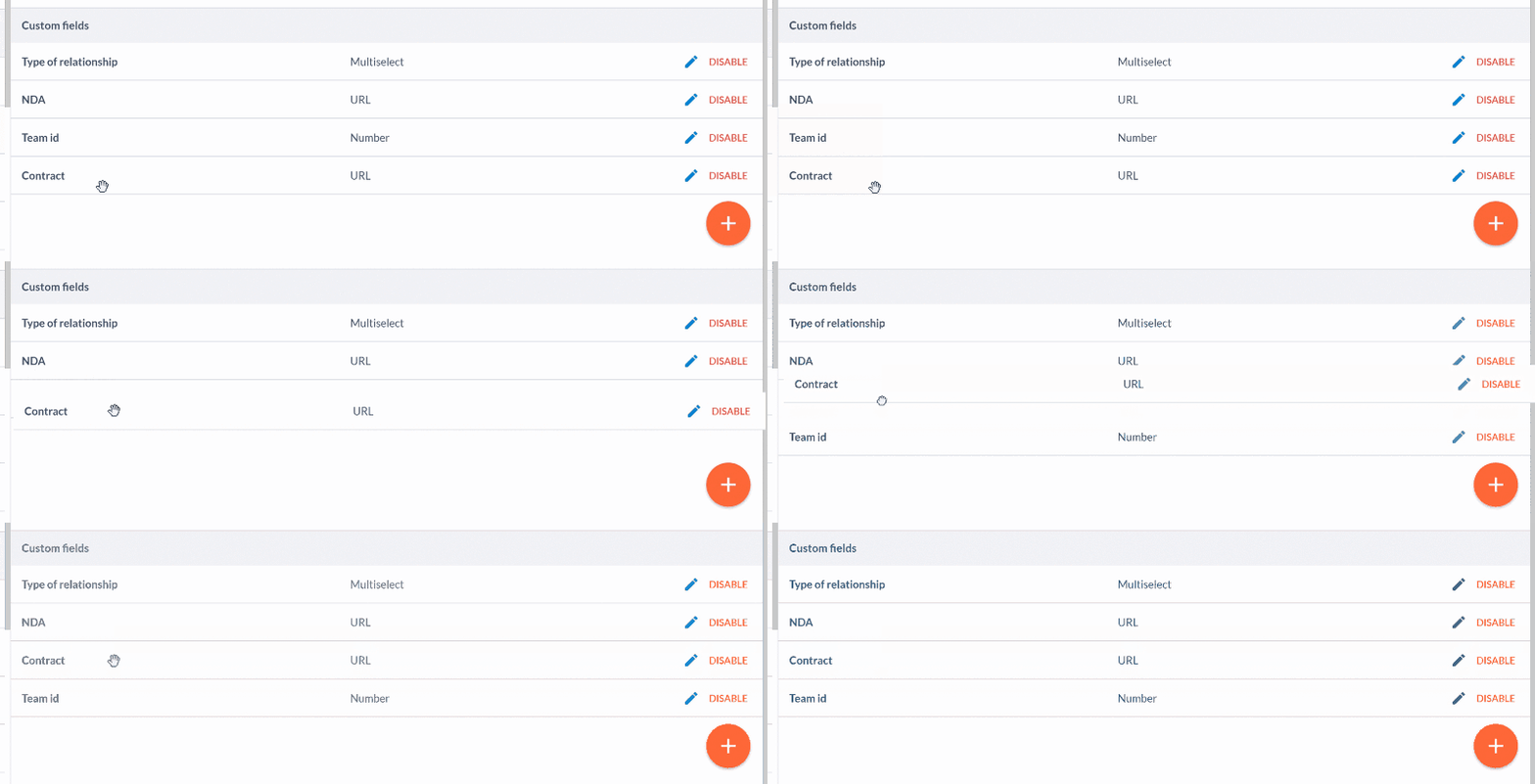
<h2 id="b25b" class="graf graf--h3 graf--leading">Order your custom&nbsp;fields</h2>
<p id="a86c" class="graf graf--p graf-after--h3">Want to re-order your custom fields? 🤔</p>
<p id="470d" class="graf graf--p graf-after--p">Just head to <a class="markup--anchor markup--p-anchor" href="https://app.salesflare.com/#/settings/customfields/account">Settings &gt; Customize fields</a> and <strong class="markup--strong markup--p-strong">drag and drop</strong>!</p>
<figure id="0408" class="graf graf--figure graf-after--p graf--trailing">
<div class="aspectRatioPlaceholder is-locked">

<p><img decoding="async" class="graf-image" src="https://blog.salesflare.com/wp-content/uploads/2017/09/0qGv5MNqxzYe5qxjk.gif"></p>
</div>
</figure>

<hr class="section-divider">

<h2 id="c63b" class="graf graf--h3 graf--leading">Faster website&nbsp;tracking</h2>
<p id="2592" class="graf graf--p graf-after--h3">We’ve made the website tracking script smaller and faster, to speed up the loading of your website. 🚀</p>
<p id="a84d" class="graf graf--p graf-after--p graf--trailing">Head to <a class="markup--anchor markup--p-anchor" href="https://app.salesflare.com/#/settings/applications">Settings &gt; Applications &amp; integrations</a> to get the new script!</p>

<hr class="section-divider">

<h2 id="6497" class="graf graf--h3 graf--leading">A series of improvements and bug&nbsp;fixes</h2>
<p id="78be" class="graf graf--p graf-after--h3">We improved the performance here and there, fixed the bugs you reported, tweaked some app flows, and much more.</p>
<p id="b8a5" class="graf graf--p graf-after--p graf--trailing">Keep the feedback coming — we thrive on it! 👊</p>

<hr class="section-divider">

<h2 id="1023" class="graf graf--h3 graf--leading">Coming up next…&nbsp;🥁</h2>
<ul class="postList">
<li id="276a" class="graf graf--li graf-after--h3">The possibility to upload files to accounts</li>
<li id="8a7c" class="graf graf--li graf-after--li">Multiple email addresses on contacts</li>
<li id="e591" class="graf graf--li graf-after--li">Bulk edit &amp; delete actions</li>
<li id="bf0b" class="graf graf--li graf-after--li graf--trailing">More task automation!</li>
</ul>

<hr class="section-divider">

<p id="a292" class="graf graf--p graf--leading graf--trailing">Got a question or need help? Feel free to <a class="markup--anchor markup--p-anchor" href="mailto:support@salesflare.com"><strong class="markup--strong markup--p-strong">send feedback</strong></a> or tweet us at <a class="markup--anchor markup--p-anchor" href="https://twitter.com/salesflare">@salesflare</a>.</p>
---

## Related

- [Fill Your Pipeline Faster, Import Smarter](https://blog.salesflare.com/fill-your-pipeline-faster.md)
- [Write Smarter, Work Your Way](https://blog.salesflare.com/write-smarter-work-your-way.md)
- [Follow Up Faster](https://blog.salesflare.com/follow-up-faster.md)
- [Fix It Fast](https://blog.salesflare.com/fix-it-fast.md)
- Previous: [Sales Heroes: Bubble Student](https://blog.salesflare.com/sales-heroes-bubble-student-c8ccfa451730.md)
- Next: [Cash in on improved lead conversion with the Poptin-Salesflare integration](https://blog.salesflare.com/cash-in-on-improved-lead-conversion-with-the-poptin-salesflare-integration-fe8c35f2c264.md)