# More sales pipelines, deeper insights.

> Create and customise multiple sales pipelines and gain deeper insights of the pipelines through our Salesflare's analytics dashboard.

Source: https://blog.salesflare.com/more-sales-pipelines-deeper-insights-9e0f4617d898
Language: en
Published: 2017-01-16  ·  Updated: 2026-06-29

---
<!-- QUARANTINED — not auto-converted.
     Medium import: .graf markup (one of the 50 identified in FINDINGS)
     Body below is the chrome-stripped source HTML, awaiting hand conversion. -->

<h2>It’s time for sales teams to go&nbsp;pro.</h2>
<hr class="section-divider">
<h2 id="c474" class="graf graf--h3 graf-after--h4">1. Pipelines. Pipelines everywhere.</h2>

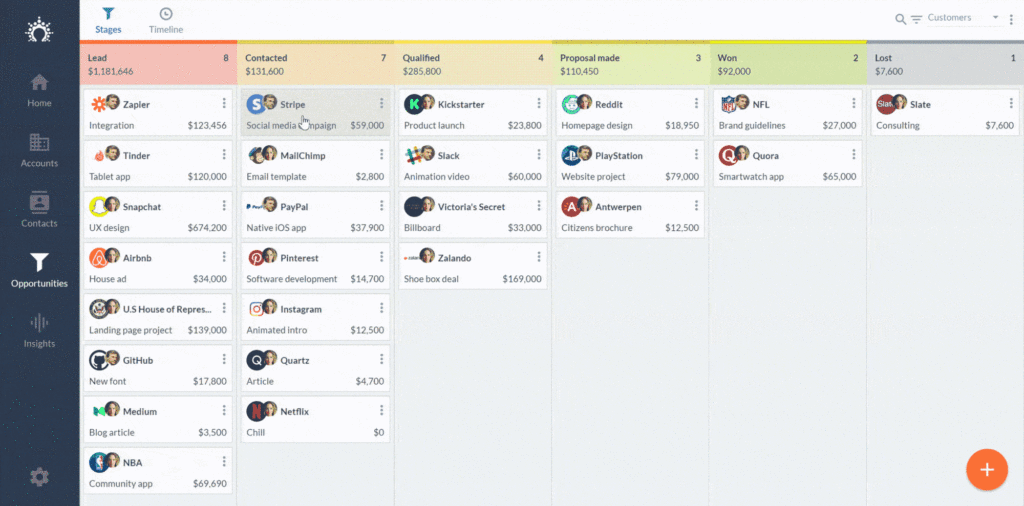
<p id="12cb" class="graf graf--p graf-after--figure">From now on you can make a pipeline for every single thing in your life that needs follow-up.</p>
<p id="6cb5" class="graf graf--p graf-after--p">For example, while testing we made extra pipelines for:</p>
<ul class="postList">
<li id="c001" class="graf graf--li graf-after--p">Investors</li>
<li id="d34f" class="graf graf--li graf-after--li">Influencers</li>
<li id="3ae7" class="graf graf--li graf-after--li">Potential hires</li>
<li id="b9e8" class="graf graf--li graf-after--li">Resellers</li>
<li id="ddd6" class="graf graf--li graf-after--li">Press</li>
<li id="52f4" class="graf graf--li graf-after--li">Dating</li>
<li id="ee1f" class="graf graf--li graf-after--li">Wedding photographers</li>
</ul>
<p id="5fd1" class="graf graf--p graf-after--li">Of course, you can also make sales pipelines for:</p>
<ul class="postList">
<li id="59b8" class="graf graf--li graf-after--p">Smaller vs. larger potential customers</li>
<li id="03c8" class="graf graf--li graf-after--li">Different products</li>
<li id="a043" class="graf graf--li graf-after--li">Upselling and cross-selling</li>
<li id="edcf" class="graf graf--li graf-after--li">Or even: support and project management</li>
</ul>

<figure id="b8d0" class="graf graf--figure graf--layoutOutsetCenter graf-after--li"><img decoding="async" class="aligncenter size-large wp-image-58490" src="https://blog.salesflare.com/wp-content/uploads/2017/01/salesflare-pipeline-1024x506.gif" alt="salesflare pipeline drag &amp; drop" width="840" height="415" srcset="https://blog.salesflare.com/wp-content/uploads/2017/01/salesflare-pipeline-1024x506.gif 1024w, https://blog.salesflare.com/wp-content/uploads/2017/01/salesflare-pipeline-300x148.gif 300w, https://blog.salesflare.com/wp-content/uploads/2017/01/salesflare-pipeline-768x380.gif 768w, https://blog.salesflare.com/wp-content/uploads/2017/01/salesflare-pipeline-1536x760.gif 1536w" sizes="(max-width: 840px) 100vw, 840px"><figcaption class="imageCaption">Salesflare’s sales pipeline: drag opportunities through the pipeline, switch pipelines, and find opportunities in no&nbsp;time.</figcaption></figure>

<p id="f268" class="graf graf--p graf-after--figure">You can easily switch pipelines with the pipeline selector at the right top. On mobile it can be found behind the three dots.</p>
<p id="4d03" class="graf graf--p graf-after--p">To create a new pipeline, just go to Settings &gt; Configure Pipelines and click the big plus button.</p>
<hr class="section-divider">
<h2 id="8da5" class="graf graf--h3 graf-after--p">2. Deeper and more beautiful insights</h2>
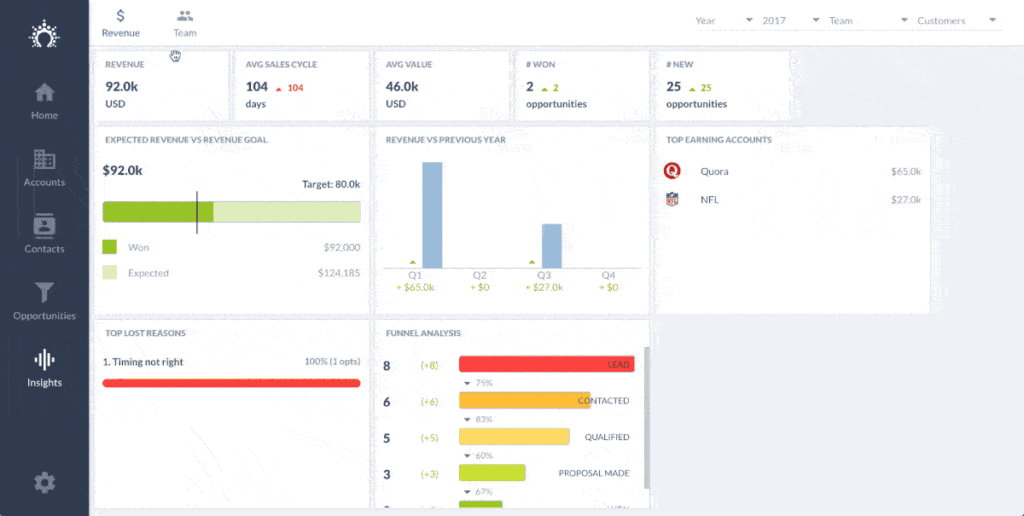
<p id="35eb" class="graf graf--p graf-after--h3">Do you enjoy exploring data and dashboards? Then you’re in luck!</p>
<p id="4ea5" class="graf graf--p graf-after--p">Salesflare’s two new dashboards show you how your team is doing regarding your bottom line and your underlying team performance.</p>

<figure id="8d6b" class="graf graf--figure graf--layoutOutsetCenter graf-after--p"><img decoding="async" class="aligncenter size-large wp-image-58686" src="https://blog.salesflare.com/wp-content/uploads/2017/01/insights-salesflare-demo-3-1-1024x516.gif" alt="salesflare insights dashboard" width="840" height="423" srcset="https://blog.salesflare.com/wp-content/uploads/2017/01/insights-salesflare-demo-3-1-1024x516.gif 1024w, https://blog.salesflare.com/wp-content/uploads/2017/01/insights-salesflare-demo-3-1-300x151.gif 300w, https://blog.salesflare.com/wp-content/uploads/2017/01/insights-salesflare-demo-3-1-768x387.gif 768w" sizes="(max-width: 840px) 100vw, 840px"><figcaption class="imageCaption">Salesflare’s <a href="/?p=59208">sales dashboard</a>: see how your team is doing or was doing at any point in time.</figcaption></figure>

<p id="7ad9" class="graf graf--p graf-after--figure">You can make reports per sales pipeline, per sales rep (or group), per specific time period and&nbsp;… you can even go back in time!</p>
<p id="b7f9" class="graf graf--p graf-after--p">It’s like Google Analytics for your sales.</p>
<hr class="section-divider">
<h2 id="f920" class="graf graf--h3 graf-after--p">3. Better Zapier integration</h2>
<p id="af81" class="graf graf--p graf-after--h3">Software is better when it all works seamlessly together. That’s why we worked to improve our Zapier integration.</p>
<p id="2287" class="graf graf--p graf-after--p">With Zapier, you can now:</p>
<ul class="postList">
<li id="795d" class="graf graf--li graf-after--p">Add contacts to an account</li>
<li id="82a5" class="graf graf--li graf-after--li">Add users to an account, to share the timeline</li>
<li id="a0e6" class="graf graf--li graf-after--li">Get phone numbers by <a href="https://www.mightycall.com/blog/best-voip-providers/">choosing the right VOIP provider</a>, and addresses of accounts and contacts more easily, making it easier to automatically sync them with, for example, your Google Contacts</li>
</ul>
<hr class="section-divider">
<h2 id="039f" class="graf graf--h3 graf-after--li">4. Many improvements and bug&nbsp;fixes</h2>
<p id="385f" class="graf graf--p graf-after--h3">As always, keep the feedback coming and we’ll keep improving!</p>
<p id="5548" class="graf graf--p graf-after--p graf--trailing">Got a question or need help? Feel free to <a class="markup--anchor markup--p-anchor" href="mailto:support@salesflare.com">send feedback</a> or tweet us at @salesflare.</p>
---

## Related

- [Fill Your Pipeline Faster, Import Smarter](https://blog.salesflare.com/fill-your-pipeline-faster.md)
- [Write Smarter, Work Your Way](https://blog.salesflare.com/write-smarter-work-your-way.md)
- [Follow Up Faster](https://blog.salesflare.com/follow-up-faster.md)
- [Fix It Fast](https://blog.salesflare.com/fix-it-fast.md)
- Previous: [27 CRM Influencers to keep on your radar](https://blog.salesflare.com/26-crm-influencers-to-keep-on-your-radar-31433c29420b.md)
- Next: [36 killer tools to turbocharge your startup stack](https://blog.salesflare.com/36-killer-tools-to-turbocharge-your-startup-stack-465061f917b7.md)