# Power up: filters & subscription revenue.

> SaaS companies — you’ll like this CRM upgrade! Find out how you can keep track of your subscription revenue using Salesflare CRM.

Source: https://blog.salesflare.com/power-up-filters-subscription-revenue-9f06875655a7
Language: en
Published: 2017-04-12  ·  Updated: 2026-06-29

---
<!-- QUARANTINED — not auto-converted.
     Medium import: .graf markup (one of the 50 identified in FINDINGS)
     Body below is the chrome-stripped source HTML, awaiting hand conversion. -->

<header></header>
<section class="p-summary"></section>

<h2>SaaS companies — you’ll like this CRM upgrade! 🚀</h2>
<hr class="section-divider">
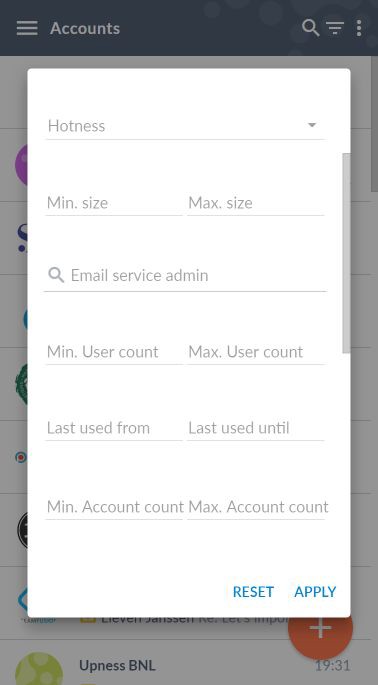
<h2 id="5973" class="graf graf--h3 graf-after--figure"><strong class="markup--strong markup--h3-strong">Filter on custom&nbsp;fields</strong></h2>
<p id="6db4" class="graf graf--p graf-after--h3">Have you started making custom data fields? Wish you could filter on them in any way you like?</p>
<p id="dd9c" class="graf graf--p graf-after--p">You’re in luck! Just hit the filter button. You can now filter on all custom fields, which opens up a whole new range of possibilities. 😎</p>
<figure id="83ae" class="graf graf--figure graf-after--p">
<div class="aspectRatioPlaceholder is-locked">
<p><img decoding="async" class="graf-image alignnone" src="https://blog.salesflare.com/wp-content/uploads/2017/04/1Hj2GEaXkz336MsUMVgscUA.jpeg" alt="salesflare dashboard on custom field filter" width="378" height="685"></p>
</div>
</figure>
<p id="5a7b" class="graf graf--p graf-after--figure">Don’t have custom fields yet? Go to <a class="markup--anchor markup--p-anchor" href="https://app.salesflare.com/#/settings/customfields/account"><strong class="markup--strong markup--p-strong">Settings &gt; Customize fields</strong></a>. There’s a lot of different field types to choose from, so you can perfectly organize all your customer data.</p>
<p id="c594" class="graf graf--p graf-after--p graf--trailing"><em class="markup--em markup--p-em">At Salesflare, we use the custom fields to store usage metrics, so that we can see how our customers are doing &amp; filter to look at segments. We also integrate fields from </em><a class="markup--anchor markup--p-anchor" href="https://www.intercom.com/"><em class="markup--em markup--p-em">Intercom</em></a><em class="markup--em markup--p-em"> for more power. For more info, contact us via Intercom! </em>😉</p>

<hr class="section-divider">

<h2 id="c4ec" class="graf graf--h3 graf--leading"><strong class="markup--strong markup--h3-strong">Subscription revenue</strong></h2>
<p id="4f44" class="graf graf--p graf-after--h3">Keeping track of subscription revenue for a SaaS company is not easy. Most CRMs don’t even properly support it. We were manually updating a spreadsheet ourselves… so we said “no more” and set out to solve this!</p>
<p id="9b6c" class="graf graf--p graf-after--p">From now on you can easily track your subscriptions in Salesflare. 📈</p>
<p id="40c4" class="graf graf--p graf-after--p">Go to <a class="markup--anchor markup--p-anchor" href="https://app.salesflare.com/#/settings/stage"><strong class="markup--strong markup--p-strong">Settings &gt; Configure pipelines</strong></a> and enable “Recurring revenue” on your pipeline. You’ll be able to set:</p>
<ul class="postList">
<li id="4732" class="graf graf--li graf-after--p">The expected customer lifetime of your subscriptions</li>
<li id="bc02" class="graf graf--li graf-after--li">The standard price per unit per period (for a SaaS company this is usually your monthly and annual price per user!)</li>
<li id="48a7" class="graf graf--li graf-after--li">The start and end date of the contract</li>
<li id="1ae8" class="graf graf--li graf-after--li">Any one-off fees</li>
</ul>
<p id="6ef5" class="graf graf--p graf-after--li">Salesflare will automatically calculate the contract duration and the total value of the deal.</p>
<p id="48ba" class="graf graf--p graf-after--p">You can set all these values through the API, so that you can fully automate the data on subscriptions if you like.</p>
<p id="0982" class="graf graf--p graf-after--p graf--trailing"><em class="markup--em markup--p-em">At Salesflare, we fully automated all the updates to this revenue data through the API and are happy to help you set this up as well! </em>💪</p>

<hr class="section-divider">

<h2 id="97db" class="graf graf--h3 graf--leading">A series of improvements and bug&nbsp;fixes</h2>
<p id="78be" class="graf graf--p graf-after--h3">We improved the performance here and there, fixed the bugs you reported, seriously upgraded the API, and much more.</p>
<p id="b8a5" class="graf graf--p graf-after--p graf--trailing">Keep the feedback coming — we thrive on it! 👊</p>

<hr class="section-divider">

<h2 id="b159" class="graf graf--h3 graf--leading"><strong class="markup--strong markup--h3-strong">Coming up next…&nbsp;</strong>🥁</h2>
<ul class="postList">
<li id="276a" class="graf graf--li graf-after--h3">Full MRR* reporting in the Insights dashboards!</li>
<li id="4777" class="graf graf--li graf-after--li">A new and infinitely more powerful automatic to do list</li>
<li id="0c30" class="graf graf--li graf-after--li">A totally revamped initial experience</li>
</ul>
<p id="14c6" class="graf graf--p graf-after--li graf--trailing">* MRR = monthly recurring revenue</p>

<hr class="section-divider">

<p id="2194" class="graf graf--p graf--leading graf--trailing">Got a question or need help? Feel free to <a class="markup--anchor markup--p-anchor" href="mailto:support@salesflare.com"><strong class="markup--strong markup--p-strong">send feedback</strong></a> or tweet us at <a class="markup--anchor markup--p-anchor" href="https://twitter.com/salesflare">@salesflare</a>.</p>

<footer>&nbsp;</footer>
---

## Related

- [Fill Your Pipeline Faster, Import Smarter](https://blog.salesflare.com/fill-your-pipeline-faster.md)
- [Write Smarter, Work Your Way](https://blog.salesflare.com/write-smarter-work-your-way.md)
- [Follow Up Faster](https://blog.salesflare.com/follow-up-faster.md)
- [Fix It Fast](https://blog.salesflare.com/fix-it-fast.md)
- Previous: [Less work. More data.](https://blog.salesflare.com/less-work-more-data-6820c61654c5.md)
- Next: [Sales Heroes: AIESEC](https://blog.salesflare.com/sales-heroes-aiesec-4dde1d21d592.md)
