# Power up your pipeline

> Power up your pipeline with bulk actions & closer integrations ⚙️ Will we ever stop making Salesflare more powerful? No, we won’t. 😎

Source: https://blog.salesflare.com/power-up-your-pipeline
Language: en
Published: 2018-02-06  ·  Updated: 2026-06-29

---
<!-- QUARANTINED — not auto-converted.
     Medium import: .graf markup (one of the 50 identified in FINDINGS)
     Body below is the chrome-stripped source HTML, awaiting hand conversion. -->

<header></header>

<h2>With bulk actions &amp; closer integrations ⚙️</h2>
<p id="4e21" class="graf graf--p graf-after--figure">Will we ever stop making Salesflare more powerful? No, we won’t. 😎</p>
<p id="ab37" class="graf graf--p graf-after--p">This product update adds even <strong class="markup--strong markup--p-strong">more automation and ease of use</strong> to Salesflare, so that you can get even more out of your favorite CRM.</p>
<p id="14ae" class="graf graf--p graf-after--p">Want to see what’s new? Just keep reading. 👇</p>
<p id="6f33" class="graf graf--p graf-after--p graf--trailing">We’re pretty sure <strong class="markup--strong markup--p-strong">you’ll love it</strong> 😍</p>

<hr class="section-divider">

<h2 id="4eba" class="graf graf--h3 graf--leading">Manage contacts &amp; accounts in&nbsp;bulk</h2>
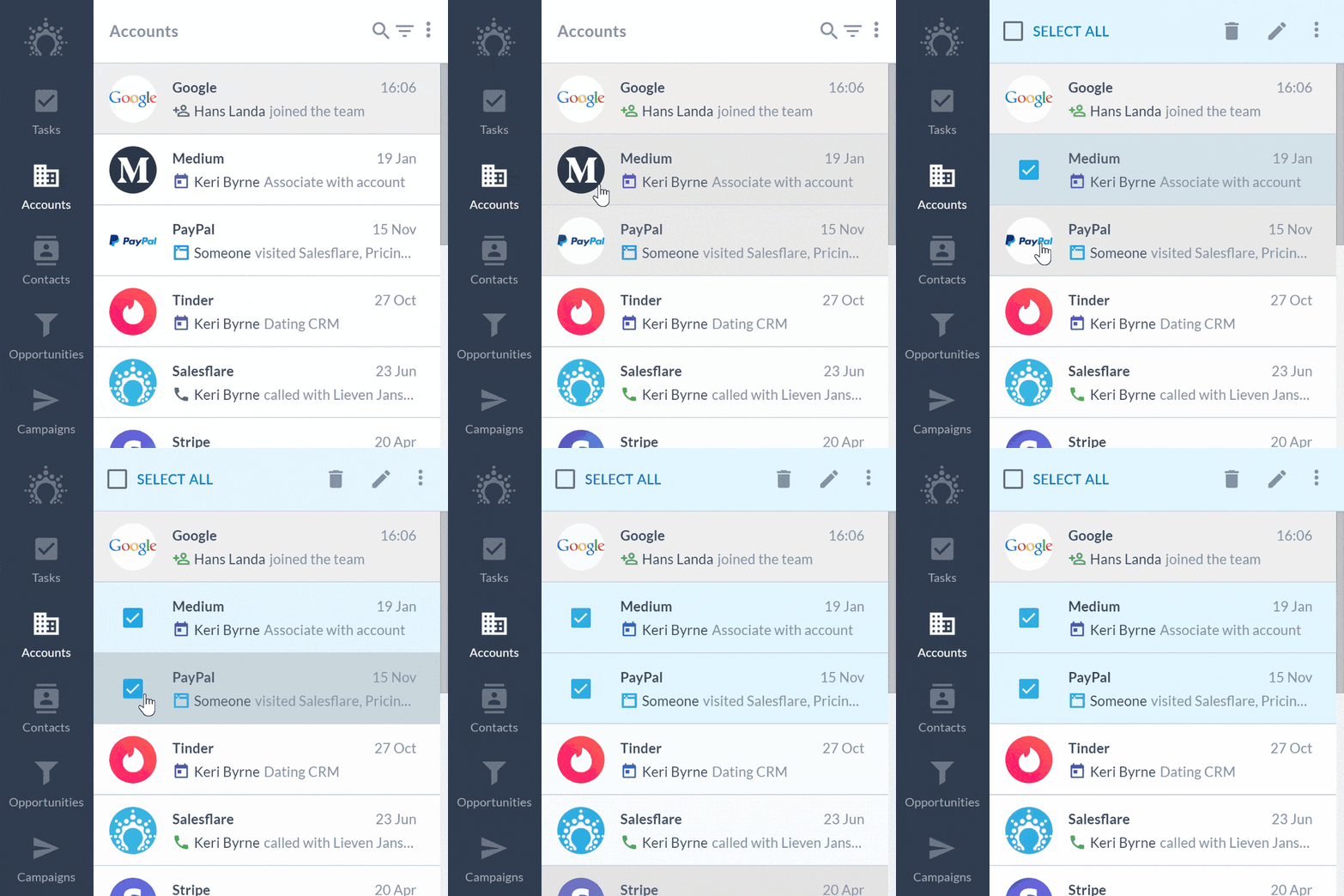
<p id="009c" class="graf graf--p graf-after--h3">For all these times you want a quicker way to apply changes to a series of contacts or accounts: we got you covered 👊</p>
<p id="cffd" class="graf graf--p graf-after--p">You can now:</p>
<ul class="postList">
<li id="5d6f" class="graf graf--li graf-after--p"><strong class="markup--strong markup--li-strong">Bulk edit</strong> contacts &amp; accounts: adding and removing tags, changing custom fields,&nbsp;… it’s all possible!</li>
<li id="e6e5" class="graf graf--li graf-after--li"><strong class="markup--strong markup--li-strong">Bulk delete</strong> contacts &amp; accounts: cleaning up is now 10x easier</li>
<li id="4217" class="graf graf--li graf-after--li"><strong class="markup--strong markup--li-strong">Bulk add &amp; remove</strong> contacts to accounts</li>
</ul>
<p id="77fe" class="graf graf--p graf-after--li">Just <strong class="markup--strong markup--p-strong">click on the avatars</strong> to enable bulk mode, then hit the checkboxes! ☑️</p>
<figure id="a9da" class="graf graf--figure graf-after--p">

</figure>
<p id="b14d" class="graf graf--p graf-after--figure graf--trailing"><img decoding="async" class="size-full wp-image-58252 aligncenter" src="https://blog.salesflare.com/wp-content/uploads/2018/02/salesflare-bulk-actions-on-accounts.gif" alt="salesflare bulk actions on accounts" width="800" height="800"></p>
<p class="graf graf--p graf-after--figure graf--trailing">Wish you’d have that on tasks &amp; opportunities as well? Say no more, it’s coming soon 😉</p>

<hr class="section-divider">

<h2 id="fbf3" class="graf graf--h3 graf--leading">Zapier integration went public&nbsp;🚀</h2>
<p id="b34a" class="graf graf--p graf-after--h3">Are you loving Salesflare’s Zapier integration? It got even better!</p>
<p id="ea58" class="graf graf--p graf-after--p">We’ve worked with the Zapier team to make it more understandable and more powerful… and to go public with our integration with <strong class="markup--strong markup--p-strong">1000+ apps</strong>! 👏</p>

<figure id="4b2e" class="graf graf--figure graf--layoutOutsetCenter graf-after--p">
<div class="aspectRatioPlaceholder is-locked">
<p><img decoding="async" class="graf-image" src="https://cdn-images-1.medium.com/max/1000/1*1zCVUuw-gjk9rBSj99ChTg.png"></p>
</div><figcaption class="imageCaption">And more at <a class="markup--anchor markup--figure-anchor" href="https://zapier.com/apps/salesflare/integrations">https://zapier.com/apps/salesflare/integrations</a>!</figcaption></figure>

<p id="f080" class="graf graf--p graf-after--figure">Not using Zapier yet? Here’s how you get started: <a class="markup--anchor markup--p-anchor" href="https://zapier.com/help/salesflare/"><strong class="markup--strong markup--p-strong">https://zapier.com/help/salesflare/</strong></a></p>
<p id="c0fc" class="graf graf--p graf-after--p">For those who are avid users of the integration, you’ll notice that you can now:</p>
<ul class="postList">
<li id="fcd6" class="graf graf--li graf-after--p"><strong class="markup--strong markup--li-strong">Find and create</strong> accounts and contacts: that means you can for instance search for an account and create it if it doesn’t exist yet — no more dupes! ✨</li>
<li id="6325" class="graf graf--li graf-after--li"><strong class="markup--strong markup--li-strong">Trigger on inactivity tasks</strong>: want to create a reminder in your calendar or personal to do app when an account becomes inactive too long? This is your savior. 😇</li>
</ul>
<p id="b488" class="graf graf--p graf-after--li graf--trailing">To make things even easier, we’re currently working on <strong class="markup--strong markup--p-strong">Zapier templates</strong>, so you can just click and enable the most common integrations. We’ll keep you posted. 👈</p>

<hr class="section-divider">

<h2 id="77c7" class="graf graf--h3 graf--leading">We’re on the Google Workspace Marketplace!</h2>
<p id="ba31" class="graf graf--p graf-after--h3">Over the last months, we’ve made steps to integrate even more closely with <a href="https://blog.salesflare.com/best-crm-for-gmail">Gmail</a>, Google Calendar and <a href="https://blog.salesflare.com/best-google-crm">Google Workspace</a> in general.</p>
<p id="5254" class="graf graf--p graf-after--p">As a preferred <strong class="markup--strong markup--p-strong">Google Workspace Technology Partner</strong>, Salesflare has now also been added to the official <strong class="markup--strong markup--p-strong">Google Workspace Marketplace</strong>.</p>
<p id="1d16" class="graf graf--p graf-after--p">Want to give us a bump up? <a class="markup--anchor markup--p-anchor" href="https://gsuite.google.com/marketplace/app/salesflare_easy_automated_crm/128469695999"><strong class="markup--strong markup--p-strong">Head to Salesflare’s listing</strong></a> and give us 5 stars.</p>
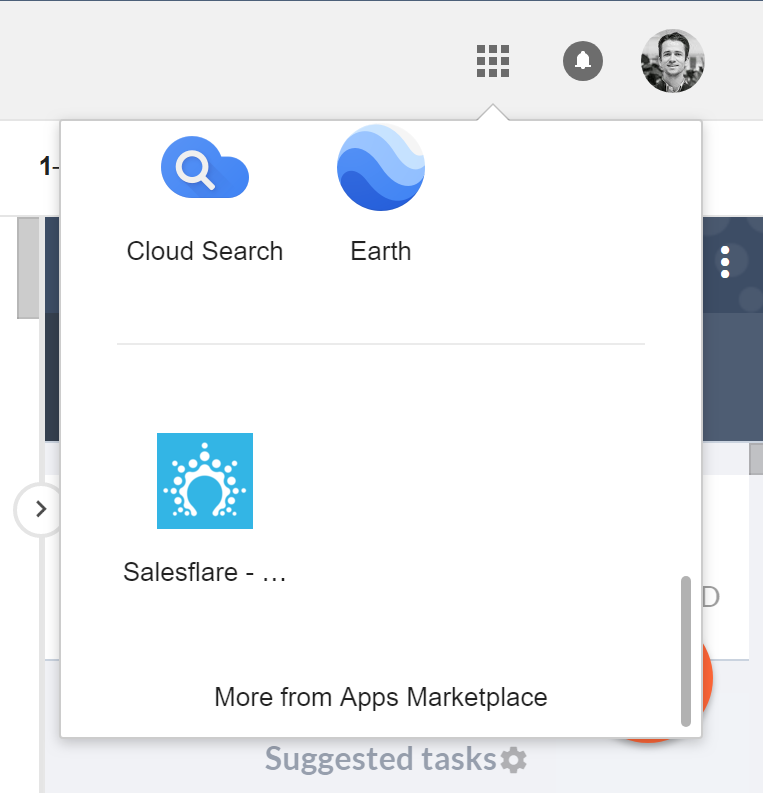
<p id="e631" class="graf graf--p graf-after--p">Cool feature: you can now add Salesflare to your <strong class="markup--strong markup--p-strong">Google App Drawer</strong> as well!</p>
<figure id="bffc" class="graf graf--figure graf-after--p graf--trailing">
<div class="aspectRatioPlaceholder is-locked">
<p><img decoding="async" class="graf-image" src="https://cdn-images-1.medium.com/max/800/1*2oTteVulbSEVZtVrS_Dbcg.png"></p>
</div><figcaption class="imageCaption">Add Salesflare to your Google App&nbsp;Drawer</figcaption></figure>

<hr class="section-divider">

<h2 id="8806" class="graf graf--h3 graf--leading">A series of improvements and bug&nbsp;fixes</h2>
<p id="3845" class="graf graf--p graf-after--h3">We improved the performance here and there, fixed the bugs you reported, tweaked some app flows, and much more.</p>
<p id="4f4f" class="graf graf--p graf-after--p">We’ve also introduced a <strong class="markup--strong markup--p-strong">Support Hero</strong> system. 🕵 Every day one developer is on standby to help out with technical issues and fix urgent ones, so that technical turnaround is even quicker and more on point.</p>
<p id="0a95" class="graf graf--p graf-after--p graf--trailing">As always, keep the feedback coming — we thrive on it!</p>

<hr class="section-divider">

<h2 id="9362" class="graf graf--h3 graf--leading">Coming up next…&nbsp;🥁</h2>
<ul class="postList">
<li id="a501" class="graf graf--li graf-after--h3">Automated emails: advanced filters &amp; public launch</li>
<li id="afe0" class="graf graf--li graf-after--li">Bulk edit &amp; delete actions: on tasks &amp; opportunities</li>
<li id="ad28" class="graf graf--li graf-after--li">A renewed and more powerful email back-end</li>
<li id="e26f" class="graf graf--li graf-after--li graf--trailing">Full GDPR compliance</li>
</ul>

<hr class="section-divider">

<p id="8e18" class="graf graf--p graf--leading">Got a question or need help? Feel free to <a class="markup--anchor markup--p-anchor" href="mailto:support@salesflare.com"><strong class="markup--strong markup--p-strong">send feedback</strong></a> or tweet us at <a class="markup--anchor markup--p-anchor" href="https://twitter.com/salesflare">@salesflare</a>.</p>

<footer>&nbsp;</footer>
---

## Related

- [Fill Your Pipeline Faster, Import Smarter](https://blog.salesflare.com/fill-your-pipeline-faster.md)
- [Write Smarter, Work Your Way](https://blog.salesflare.com/write-smarter-work-your-way.md)
- [Follow Up Faster](https://blog.salesflare.com/follow-up-faster.md)
- [Fix It Fast](https://blog.salesflare.com/fix-it-fast.md)
- Previous: [Keep everything in one place](https://blog.salesflare.com/keep-everything-in-one-place-622a52367a9c.md)
- Next: [Your CRM and GDPR](https://blog.salesflare.com/your-crm-and-gdpr-769120282357.md)