# 减少工作量。更多数据。

> 70% 以上，减少数据录入时间。Salesflare 是一款顶级销售自动化工具，可帮助销售人员更有效地进行销售。

Source: https://blog.salesflare.com/zh/%E5%B7%A5%E4%BD%9C%E6%9B%B4%E5%B0%91%EF%BC%8C%E6%95%B0%E6%8D%AE%E6%9B%B4%E5%A4%9A-6820c61654c5
Language: zh
Published: 2017-03-05  ·  Updated: 2017-10-24

---
<!-- QUARANTINED — not auto-converted.
     Medium import: .graf markup (one of the 50 identified in FINDINGS)
     Body below is the chrome-stripped source HTML, awaiting hand conversion. -->

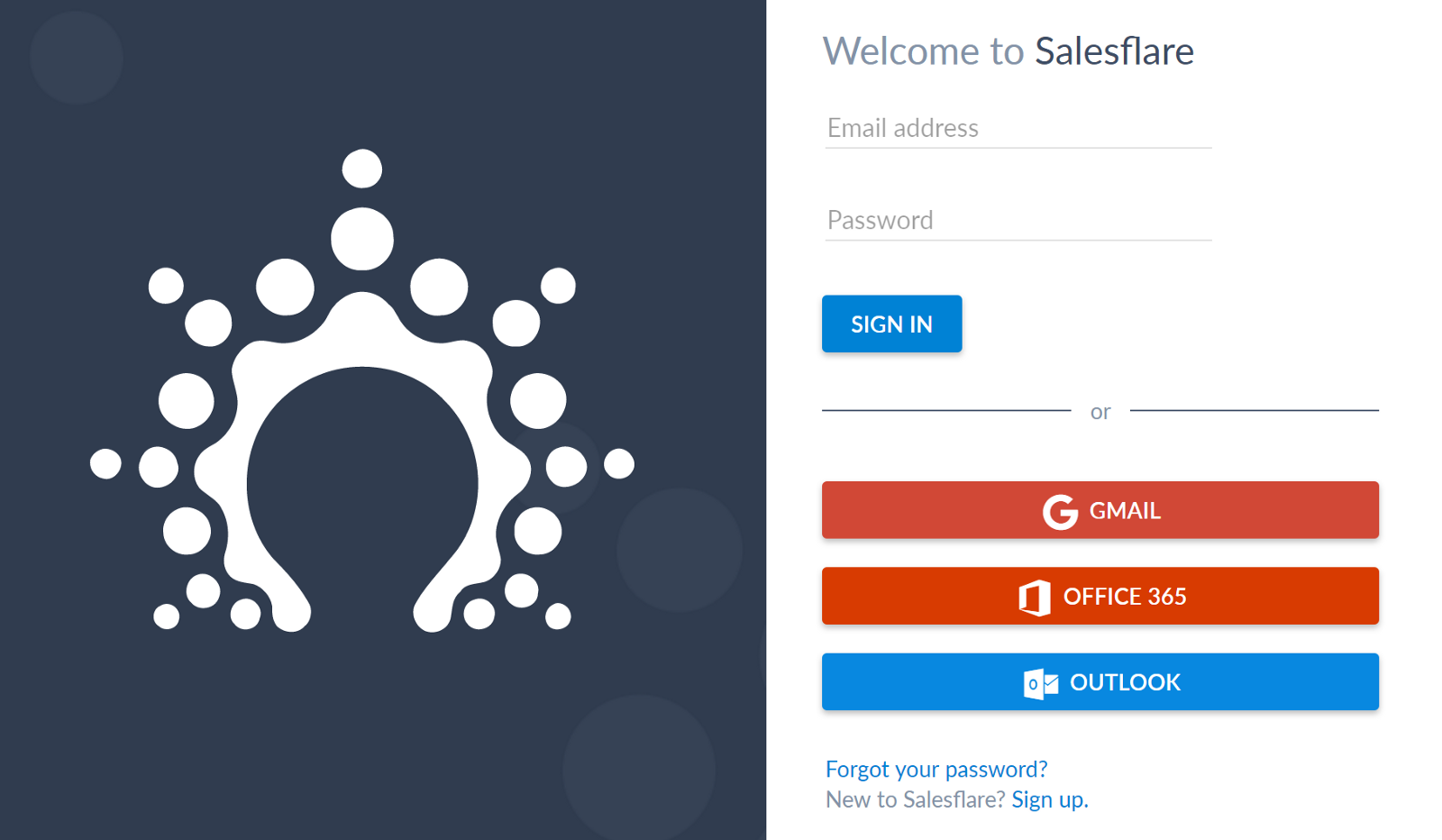
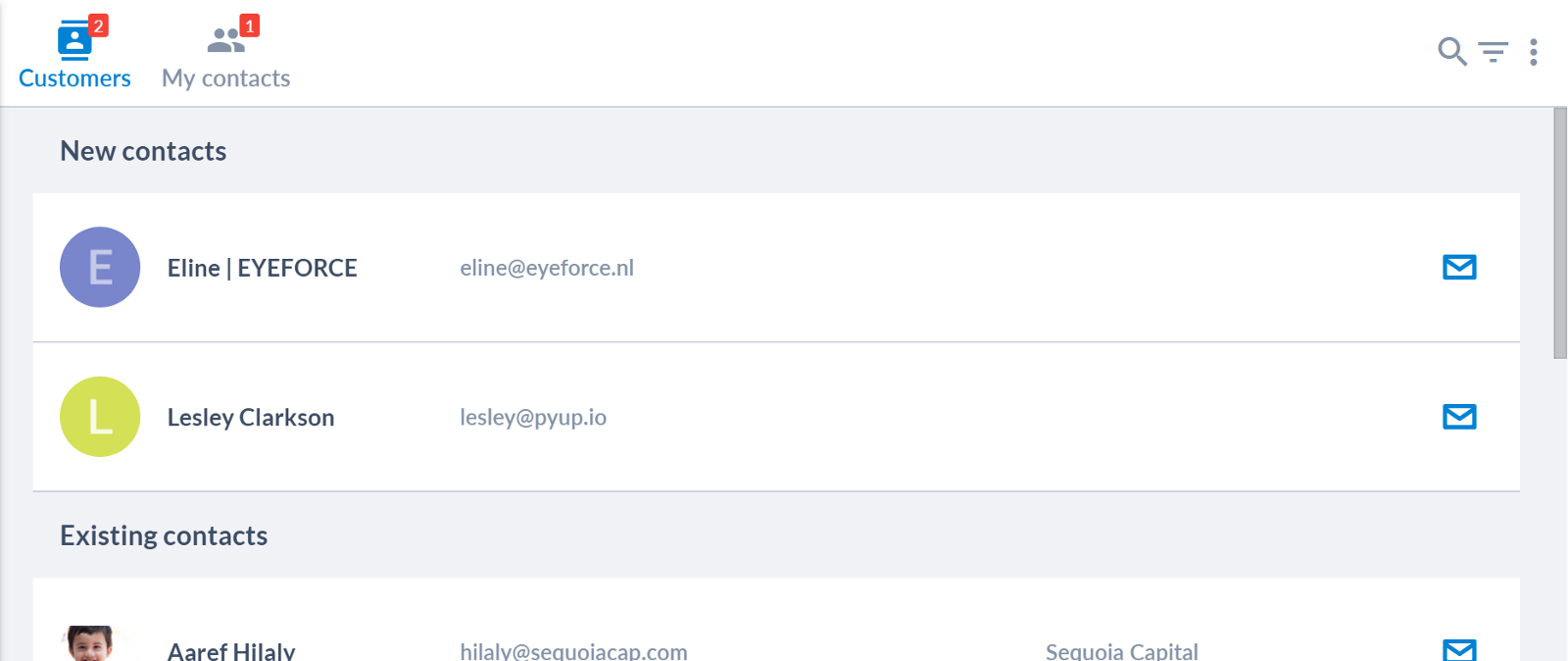
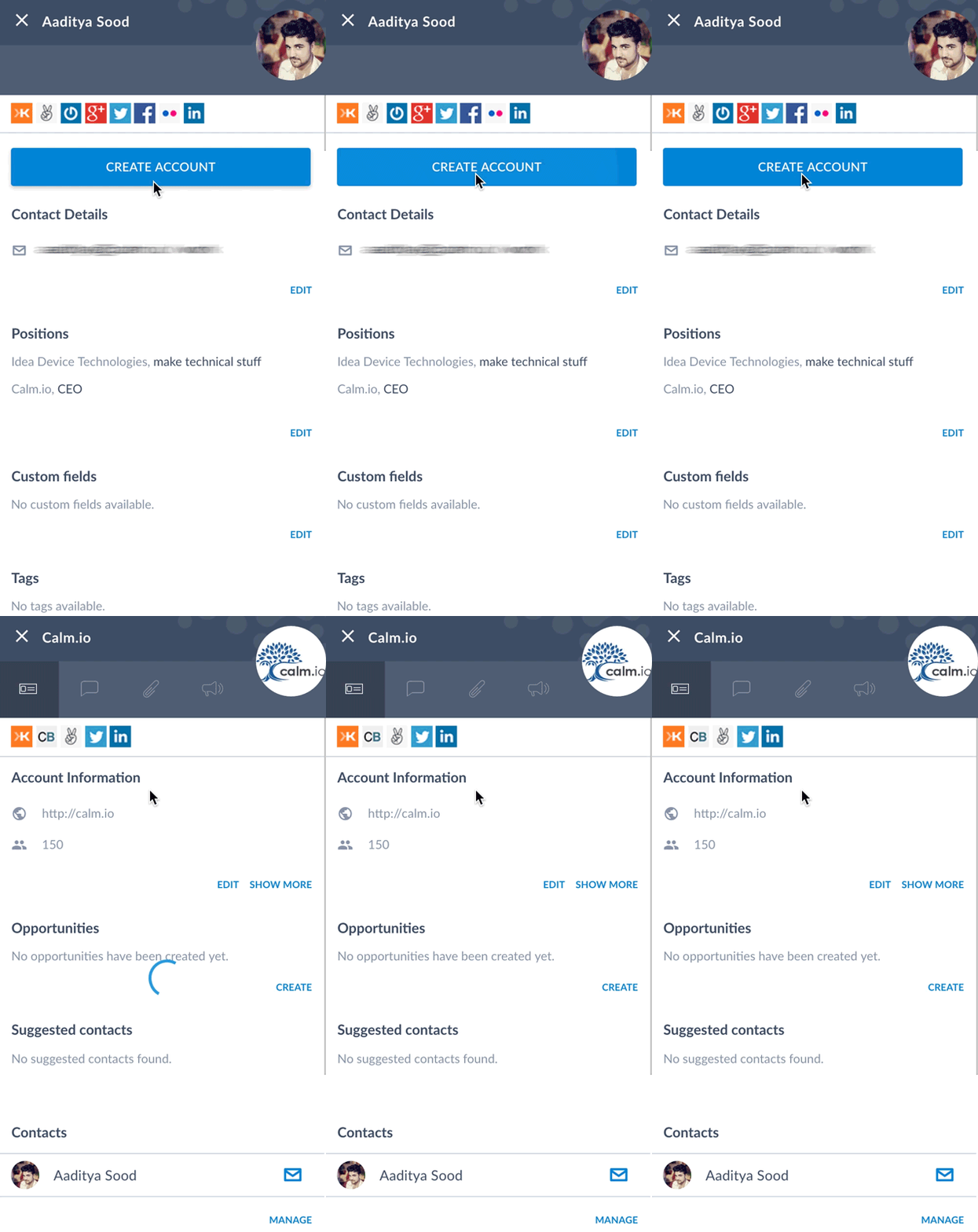
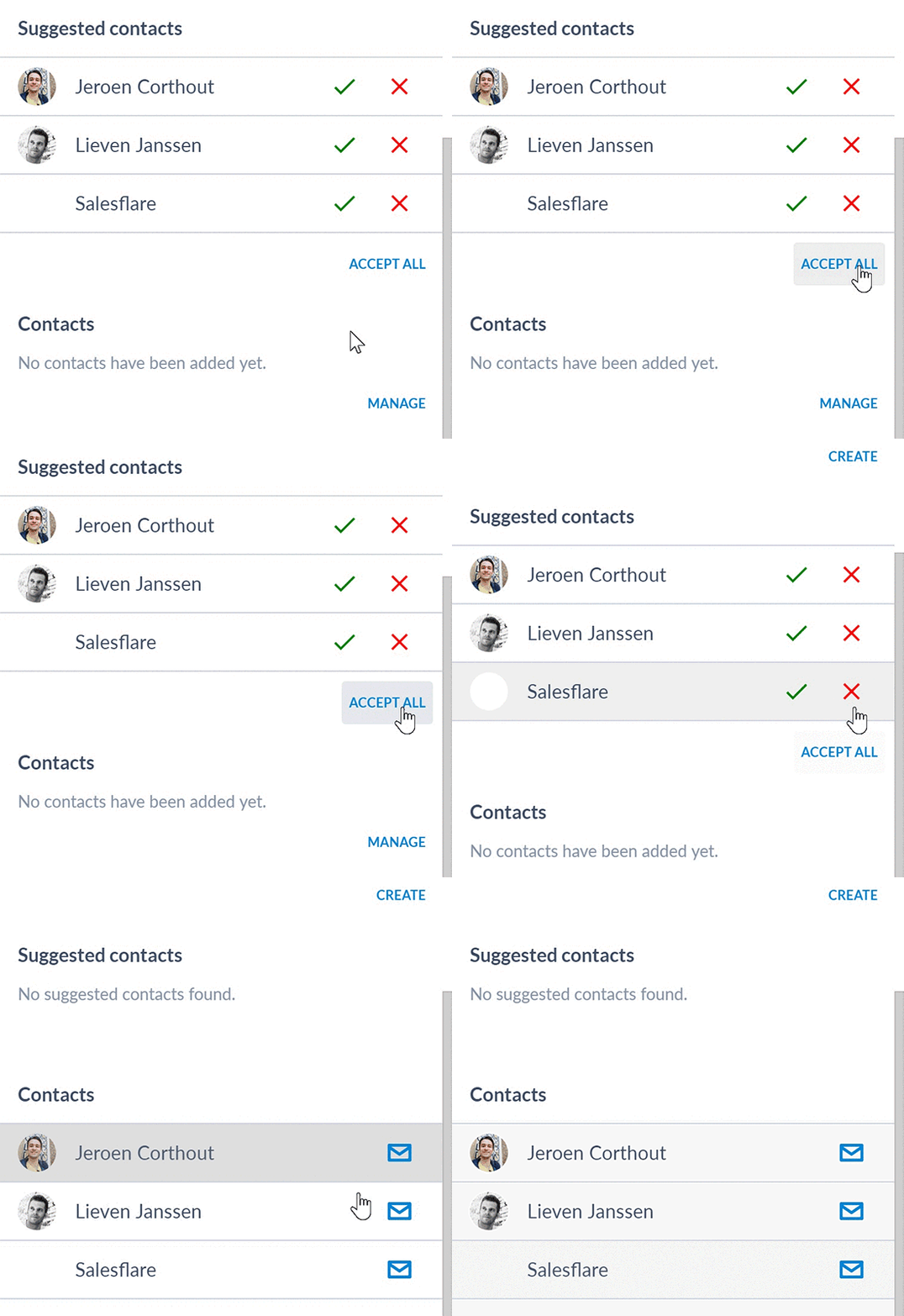
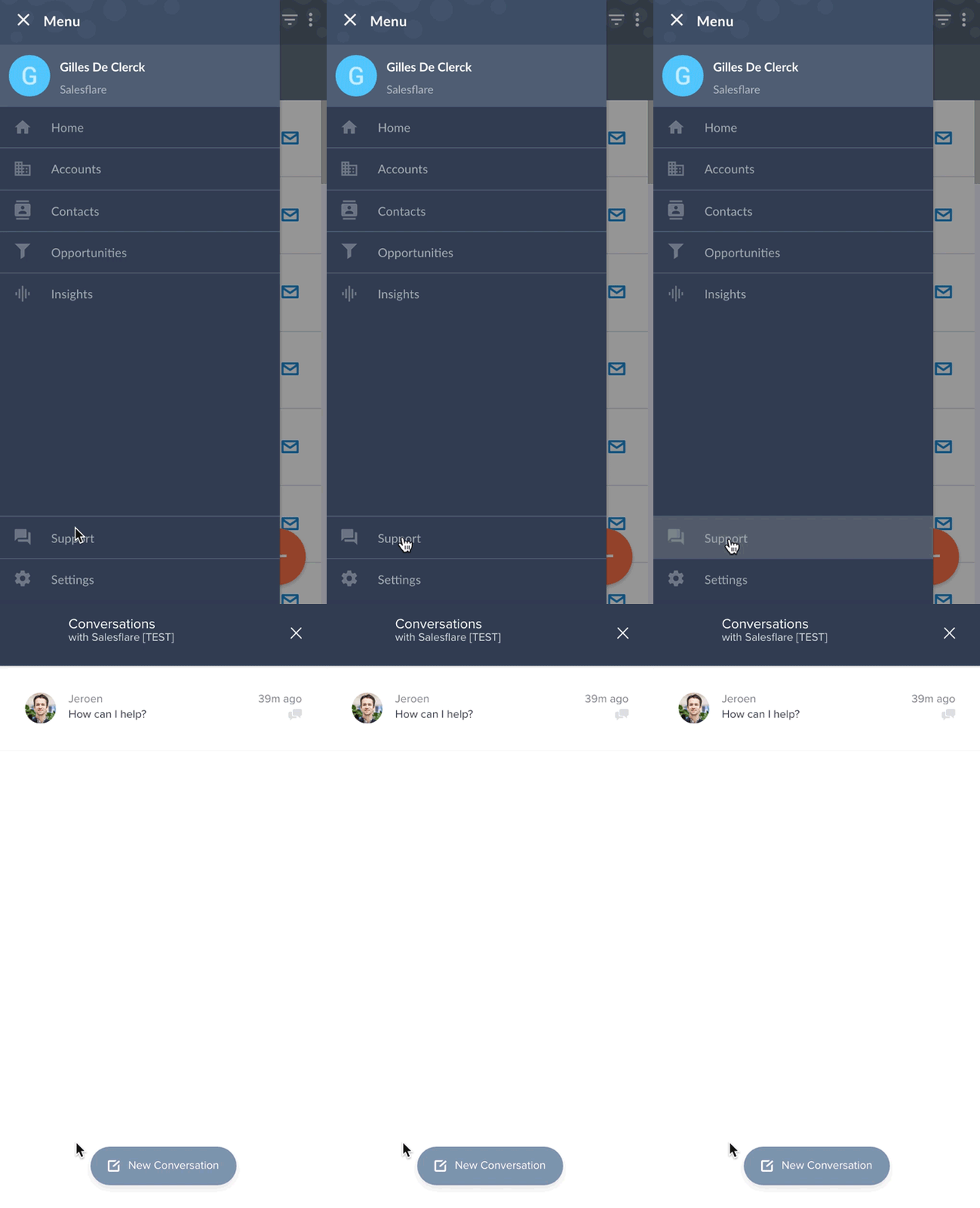
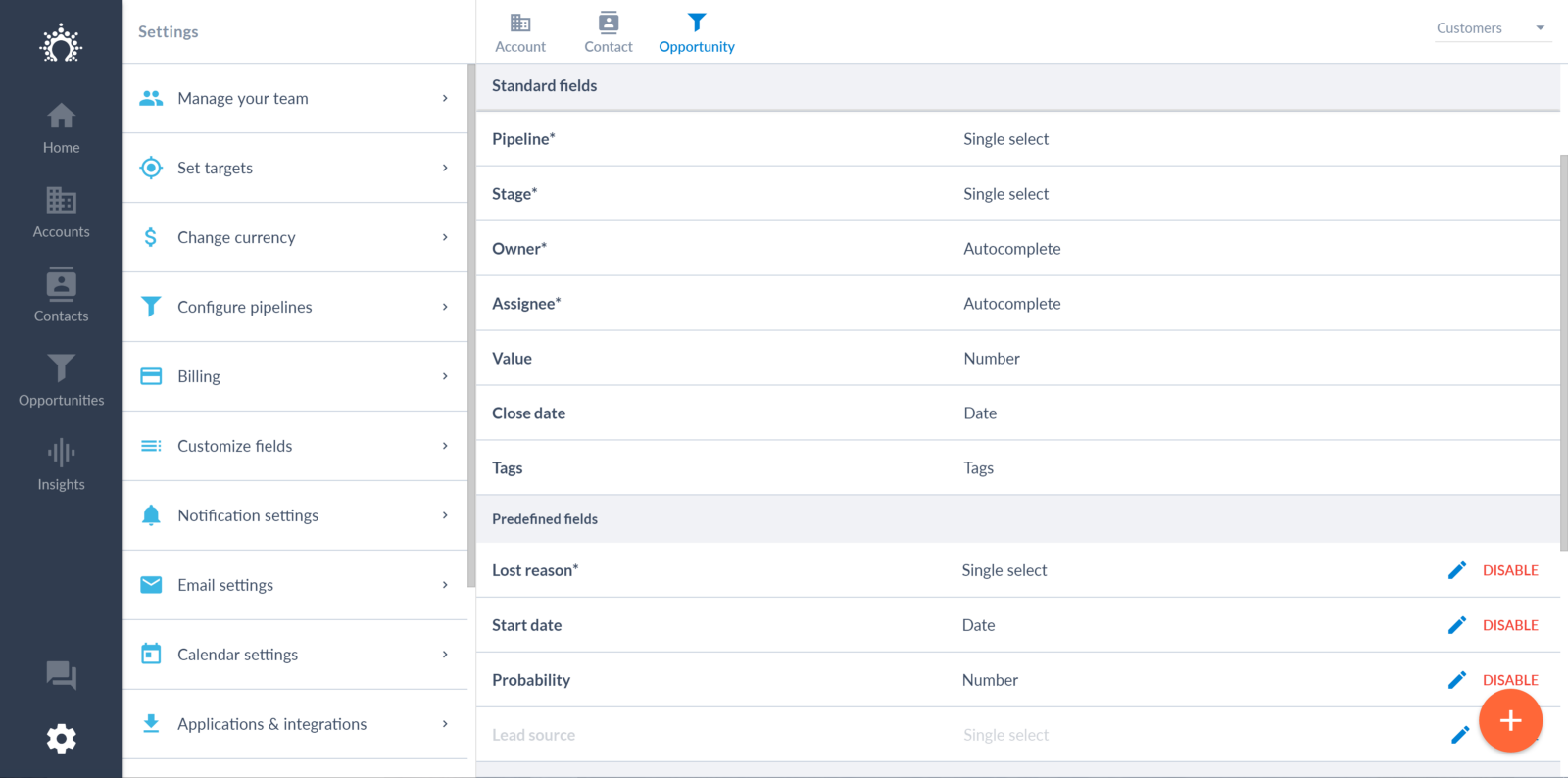
<h2 id="d794" class="graf graf--h3 graf-after--figure">将客户数据保存在自定义字段中</h2><p id="f5f9" class="graf graf--p graf-after--h3">从现在起，您可以在 Salesflare 中存储 <strong class="markup--strong markup--p-strong">* 您的所有客户数据</strong>。</p><p id="c301" class="graf graf--p graf-after--p">只需添加一些自定义字段即可。</p><p id="f687" class="graf graf--p graf-after--p">我们已经支持 <strong class="markup--strong markup--p-strong">以下类型</strong>：短文本、长文本、数字、单选、多选、自动完成、标记、日期和 URL。</p><p id="c7df" class="graf graf--p graf-after--p">除此之外，我们还添加了一些 <strong class="markup--strong markup--p-strong"> 预定义字段</strong>。为什么？</p><ul class="postList"><li id="c43c" class="graf graf--li graf-after--p">它们带有<strong class="markup--strong markup--li-strong">标准选项列表</strong>。</li><li id="2937" class="graf graf--li graf-after--li">您可以<strong class="markup--strong markup--li-strong">报告</strong>它们</li><li id="4ff0" class="graf graf--li graf-after--li">它们带有 <strong class="markup--strong markup--li-strong">内在逻辑</strong></li></ul><p id="ebdd" class="graf graf--p graf-after--li">添加了以下预定义字段：</p><ul class="postList"><li id="cd54" class="graf graf--li graf-after--p"><strong class="markup--strong markup--li-strong">失去理由</strong>:说明您失去机会的原因并报告。这个字段以前是标准字段，但现在如果您不喜欢，可以将其关闭。</li><li id="fd06" class="graf graf--li graf-after--li"><strong class="markup--strong markup--li-strong">开始日期</strong>:您是否在机会开始之前就创建了机会？有一个开始日期字段可以确保它以正确的方式出现在报告中，并显示正确的销售周期。</li><li id="97fd" class="graf graf--li graf-after--li"><strong class="markup--strong markup--li-strong">铅源</strong>:想知道您的潜在客户来自哪里？添加线索来源。</li><li id="858a" class="graf graf--li graf-after--li"><strong class="markup--strong markup--li-strong">个人机会的概率</strong>:阶段级概率对您来说还不够吗？那就打开机会概率栏吧。</li></ul><p id="ae57" class="graf graf--p graf-after--li">想到我们可以添加的其他预定义字段了吗？请大声说出来！</p><figure id="c317" class="graf graf--figure graf-after--p graf--trailing"><div class="aspectRatioPlaceholder is-locked"><img decoding="async" class="graf-image alignnone" src="https://blog.salesflare.com/wp-content/uploads/2017/03/1KnP-XfxYD1izv3JHu29Tcw-2.png" alt="Salesflare CRM 平台上的机会字段" width="1600" height="794" loading="lazy" fetchpriority="low"></div><figcaption class="imageCaption">将客户数据保存在自定义字段中。</figcaption></figure><hr class="section-divider"><h2 id="a4c4" class="graf graf--h3 graf--leading">使用电子邮件帐户登录和注册</h2><p id="5baa" class="graf graf--p graf-after--h3">您是<strong class="markup--strong markup--p-strong"> Google、Office365 或 Outlook.com</strong> 用户吗？那您就走运了。</p><p id="0bc2" class="graf graf--p graf-after--p">无需再填写或记住您的 Salesflare 密码。您只需注册或使用电子邮件帐户登录即可。</p><figure id="605b" class="graf graf--figure graf-after--p graf--trailing"><div class="aspectRatioPlaceholder is-locked"><img decoding="async" class="graf-image alignnone" src="https://blog.salesflare.com/wp-content/uploads/2017/03/1m0Co68XdyMmGbKtdxxipUQ-2.png" alt="Salesflare 电子邮件与 Gmail、Office 365 和 Outlook 整合" width="1600" height="932" loading="lazy" fetchpriority="low"></div><figcaption class="imageCaption">使用电子邮件帐户登录和注册</figcaption></figure><hr class="section-divider"><h2 id="1ce0" class="graf graf--h3 graf--leading">了解您的新联系人</h2><p id="7d4b" class="graf graf--p graf-after--h3">你是否有时会想，你最近接触过谁？</p><p id="acc6" class="graf graf--p graf-after--p">从现在起，Salesflare 将显示<strong class="markup--strong标记--p-strong">您有多少个新联系人</strong>。以及 <strong class="markup--strong markup--p-strong"> 哪些联系人</strong>。</p><p id="ea3e" class="graf graf--p graf-after--p">查看接触片上的红色指示。</p><figure id="0243" class="graf graf--figure graf-after--p graf--trailing"><div class="aspectRatioPlaceholder is-locked"><img decoding="async" class="graf-image alignnone" src="https://blog.salesflare.com/wp-content/uploads/2017/03/16X5sUiS56jYqmtBLzoEQwA-2.png" alt="Salesflare CRM 平台上的新联系人列表" width="1600" height="674" loading="lazy" fetchpriority="low"></div><figcaption class="imageCaption">了解您有多少新联系人。以及哪些联系人。</figcaption></figure><hr class="section-divider"><h2 id="0f7e" class="graf graf--h3 graf--leading">从联系人创建账户</h2><p id="14d5" class="graf graf--p graf-after--h3">有人问我们是否可以通过联系人创建账户。现在可以了！</p><p id="1c8b" class="graf graf--p graf-after--p">只需打开一个尚未建立账户的联系人，然后点击 "创建账户 "按钮。该联系人的账户将被创建，<strong class="markup--strong标记--p-strong">账户中将填写所有可用信息</strong>。</p><figure id="7c15" class="graf graf--figure graf-after--p graf--trailing"><div class="aspectRatioPlaceholder is-locked"><img decoding="async" class="graf-image alignnone" src="https://blog.salesflare.com/wp-content/uploads/2017/03/1kTkNXb3AQSUQcIHAMs8ywQ-2.gif" alt="通过 Salesflare CRM 平台上的联系人创建账户" width="424" height="800" loading="lazy" fetchpriority="low"></div><figcaption class="imageCaption">从联系人创建账户</figcaption></figure><hr class="section-divider"><h2 id="0c82" class="graf graf--h3 graf--leading">删除联系人</h2><p id="71bf" class="graf graf--p graf-after--h3">到目前为止，您还不能删除联系人，因为这会对自动化产生重大影响。现在可以了。</p><p id="d3b1" class="graf graf--p graf-after--p graf--trailing">此外：Salesflare 还保留了 <strong class="markup--strong markup--p-strong"> 删除联系人的完整历史记录</strong>，因此您永远不会忘记您讨论过的内容。</p><hr class="section-divider"><h2 id="a71f" class="graf graf--h3 graf--leading">一键接受所有建议</h2><p id="e913" class="graf graf--p graf-after--h3">对某个账户有大量建议？只需点击 <strong class="markup--strong markup--p-strong">"全部接受"</strong>。</p><p id="6206" class="graf graf--p graf-after--p">有几个您不想接受的？那么您可以先点击红叉来拒绝它们。</p><figure id="f816" class="graf graf--figure graf-after--p graf--trailing"><div class="aspectRatioPlaceholder is-locked"><img decoding="async" class="graf-image alignnone" src="https://blog.salesflare.com/wp-content/uploads/2017/03/1PgueJak8RpFi3RuZhjUh_A-2.gif" alt="Salesflare CRM 平台上的建议联系人" width="550" height="534" loading="lazy" fetchpriority="low"></div><figcaption class="imageCaption">一键接受所有建议</figcaption></figure><hr class="section-divider"><h2 id="37e8" class="graf graf--h3 graf--leading">在 Salesflare 内与我们聊天</h2><p id="2cbb" class="graf graf--p graf-after--h3">我们始终通过电子邮件、Skype、Twitter、LinkedIn、Facebook Messenger 和电话为用户提供服务。<strong class="markup--strong标记--p-strong">我们以您喜欢的方式进行沟通</strong>。</p><p id="65ed" class="graf graf--p graf-after--p">为了更方便地联系我们，您现在可以<strong class="markup--strong标记--p-strong">直接从应用程序</strong>与我们聊天。您还可以从<strong class="markup--strong标记--p-strong">网站</strong>与我们聊天。</p><p id="c5c5" class="graf graf--p graf-after--p">只需点击 "支持 "按钮，我们很乐意为您提供帮助！</p><figure id="8138" class="graf graf--figure graf-after--p graf--trailing"><div class="aspectRatioPlaceholder is-locked"><img decoding="async" class="graf-image alignnone" src="https://blog.salesflare.com/wp-content/uploads/2017/03/1V5aDu4cQh4hKRWa4aJgKjg-2.gif" alt="Salesflare CRM 平台的响应支持功能" width="433" height="800" loading="lazy" fetchpriority="low"></div><figcaption class="imageCaption">在 Salesflare 内与我们聊天。</figcaption></figure><hr class="section-divider"><p id="ef1a" class="graf graf--p graf--leading graf--trailing">有问题或需要帮助？请随时<a class="markup--anchor markup--p-anchor" href="mailto:support@salesflare.com"><strong class="markup--strong markup--p-strong">发送反馈</strong></a>或通过<a class="markup--anchor markup--p-anchor" href="https://twitter.com/salesflare">@salesflare</a>.</p>
---

## Related

- [更快地填充销售线索，更智能地导入数据](https://blog.salesflare.com/zh/%E6%9B%B4%E5%BF%AB%E5%9C%B0%E5%A1%AB%E5%85%85%E6%82%A8%E7%9A%84%E9%94%80%E5%94%AE%E7%AE%A1%E9%81%93.md)
- [更聪明地写作，按自己的方式工作](https://blog.salesflare.com/zh/%E7%94%A8%E4%BD%A0%E7%9A%84%E6%96%B9%E5%BC%8F%E6%9B%B4%E8%81%AA%E6%98%8E%E5%9C%B0%E5%B7%A5%E4%BD%9C.md)
- [更快跟进](https://blog.salesflare.com/zh/%E5%8A%A0%E5%BF%AB%E8%B7%9F%E8%BF%9B.md)
- [快速修复](https://blog.salesflare.com/zh/%E5%B0%BD%E5%BF%AB%E8%A7%A3%E5%86%B3.md)
- Previous: [如何在社交媒体上销售](https://blog.salesflare.com/zh/%E5%A6%82%E4%BD%95%E5%9C%A8%E7%A4%BE%E4%BA%A4%E5%AA%92%E4%BD%93%E4%B8%8A%E9%94%80%E5%94%AE-771c4648d568.md)
- Next: [增强动力：过滤器和订阅收入。](https://blog.salesflare.com/zh/power-up-filters-%E8%AE%A2%E9%98%85%E6%94%B6%E5%85%A5-9f06875655a7.md)